 OnlyLoader
How Does OnlyFans Work for Viewers?

OnlyFans has grown into one of the most popular subscription-based content platforms on the internet. While it is widely known for adult content, the platform also hosts fitness trainers, musicians, influencers, and educators who share exclusive material with paying fans. For viewers, OnlyFans offers a more direct, personalized way to support creators and access content that is not available on traditional social media platforms.
However, for many new users, the platform can feel confusing at first. How do subscriptions work? What content is included? Why do some posts cost extra even after you subscribe? And how do payments, privacy, and renewals function? This article explains how OnlyFans works for viewers, step by step, so you can use the platform confidently and avoid unexpected charges.
1. How Does OnlyFans Work for Viewers?
1.1 Creating an Account
To use OnlyFans as a viewer, you first need to create an account. Registration requires an email address or a linked Google or X (Twitter) account. You must verify your email and confirm that you are at least 18 years old.
Before you can subscribe to any creators, you must also add a valid payment method, usually a credit or debit card. OnlyFans does not allow browsing full content without an account and payment setup.
1.2 Finding and Subscribing to Creators
Once logged in, viewers can search for creators by username, follow shared links, or discover creators through social media promotions. Each creator sets their own subscription model, which generally falls into one of two categories:
Paid subscriptions
These require a monthly fee, typically ranging from $5 to $25 per month. While subscribed, you can view the creator’s feed content that is included in the subscription.
Free subscriptions
Some creators offer free accounts. While you can follow them without paying, most of their content is locked behind pay-per-view (PPV) posts or messages.
Subscriptions are set to auto-renew by default and require manual cancellation to stop future charges.
1.3 What Content Viewers Can Access
The type of content available depends entirely on the creator. As a viewer, you may see:
- Photos and photo sets
- Short and long-form videos
- Text posts and updates
- Stories that expire after 24 hours
- Livestreams
- Polls and interactive posts
Some creators include most of their content in the subscription price, while others rely heavily on PPV content for additional income.
1.4 Pay-Per-View (PPV) Content
One of the most important things for viewers to understand is PPV content. Even if you pay for a subscription, creators may send locked posts or private messages that require an additional one-time payment to unlock.
PPV content may include exclusive videos, premium photo sets, or custom content. Prices vary widely and are set by the creator. Once unlocked, the content remains accessible in your account as long as your account exists.
1.5 Messaging and Interaction
OnlyFans allows viewers to message creators directly, which is one of the platform’s biggest draws. However, messaging rules differ by creator:
- Some allow free messaging
- Others charge per message
- Many expect tips for custom requests or priority replies
Creators are independent and are not required to respond unless they advertise guaranteed replies. Custom content requests, such as personalized videos or photos, are usually paid separately.
1.6 Tips and Additional Payments
Viewers can tip creators at any time, either on posts, during livestreams, or in private messages. Tipping is optional but often encouraged, especially for special requests or ongoing interaction.
OnlyFans takes a platform fee from creator earnings, but viewers do not pay extra fees beyond the listed prices.
1.7 Billing, Renewals, and Refunds
Subscriptions on OnlyFans renew automatically by default. If you do not want to be charged again, you must manually disable auto-renew before the next billing date. Canceling a subscription does not remove access immediately; you keep access until the end of the paid period.
Refunds are rare. OnlyFans generally considers subscriptions and PPV purchases non-refundable, except in cases of accidental or unauthorized charges. This makes it important for viewers to monitor subscriptions and payment history carefully.
1.8 Privacy and Anonymity for Viewers
OnlyFans provides viewers with a solid degree of privacy and anonymity. Creators do not see your real name, email address, or payment information. They only see your username, profile picture, and interaction history.
However, your activity—such as likes, comments, and messages—is visible to the creators you subscribe to. Choosing a neutral username can help maintain anonymity.
1.9 Limitations for Viewers
From a viewer’s perspective, OnlyFans has some important limitations:
- There is no official download button for saving content
- Content access ends when your subscription expires
- Sharing or redistributing content violates platform rules
2. Bonus: Back Up Creator Content with OnlyLoader
Many viewers subscribe to creators for months or even years and may want to back up content they have paid for for personal reference or offline viewing. Since OnlyFans does not offer a built-in download feature, specialized tools exist to help manage purchased content more efficiently.
OnlyLoader is a dedicated OnlyFans bulk downloader designed for viewers who want a more organized way to save videos and photos they already have access to.
Key Features of OnlyLoader :
- Download videos and photos from subscribed creators in bulk.
- Preserve original media quality, with support for ultra-high resolutions up to 8K.
- Built-in browser simplifies logging in and navigating creator profiles.
- Smart filters let you select photos by resolution, format, or content type.
- Export media in widely supported formats such as MP4, MP3, JPG, and PNG.
- Clean, intuitive interface designed for beginners and non-technical users.
How to Use OnlyLoader to Back Up Creator Content:
- Download and install OnlyLoader on your Windows or Mac computer.
- Launch OnlyLoader and sign in to your OnlyFans account using the built-in browser. Once logged in, navigate to the creator profile within the app (make sure you are subscribed so the content is accessible).
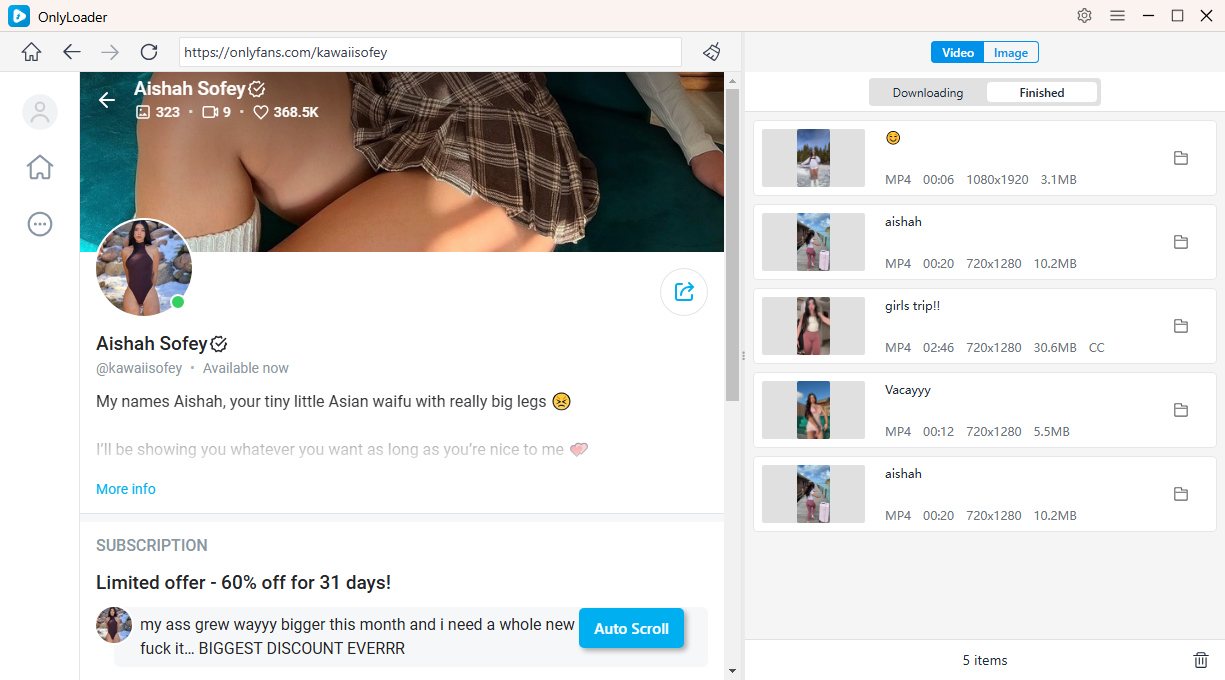
- To download OnlyFans videos, open any video on the creator page and click the Download button. The video will be added to OnlyLoader ’s queue, and the software will automatically download all queued videos in bulk.
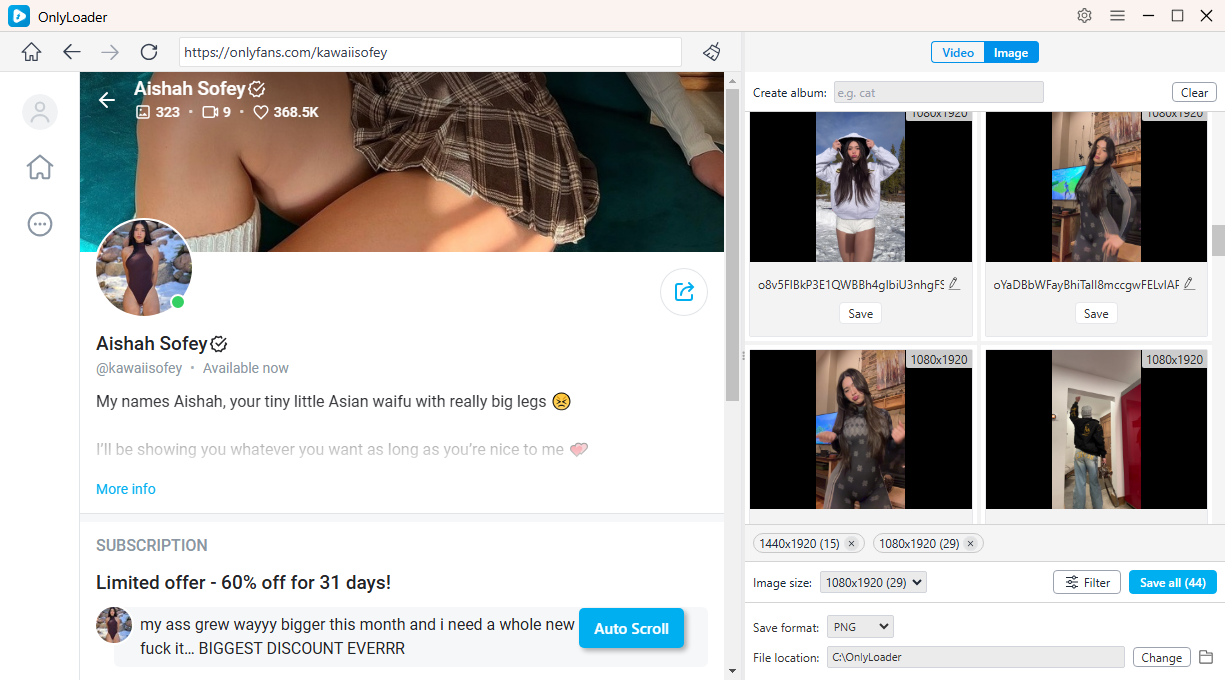
- To download OnlyFans photos, enable OnlyLoader ’s auto-click feature to automatically extract all photos from the profile. Once the images are detected, you can filter them by type or resolution and download all selected photos with a single click.
3. Conclusion
For viewers, OnlyFans works as a direct subscription platform where you pay creators for exclusive access, premium content, and interaction. Understanding subscriptions, PPV content, auto-renewals, and messaging rules helps you avoid unexpected charges and get the most value from your experience.
If you regularly support creators and want a more efficient way to manage and back up the content you’ve paid for, OnlyLoader stands out as a practical solution. With bulk downloading, high-quality support, and a user-friendly design, it offers viewers a convenient way to organize their OnlyFans experience beyond the browser.
By combining a clear understanding of how OnlyFans works with the right tools, viewers can enjoy the platform more confidently and responsibly.