 OnlyLoader
Hvordan finder man nogen på OnlyFans via telefonnummer?

I takt med at OnlyFans fortsætter med at vokse, stiller mange mennesker det samme spørgsmål: Kan du finde nogen på OnlyFans via telefonnummer? Denne nysgerrighed stammer typisk fra et ønske om at bekræfte, om nogen, du kender, er på platformen, eller fra at du forsøger at finde en skaber, hvis kontaktoplysninger du allerede har. OnlyFans fungerer dog meget anderledes end traditionelle sociale medieplatforme, især når det kommer til privatliv.
I denne artikel vil vi forklare, om det er muligt at finde nogen på OnlyFans ved hjælp af et telefonnummer, beskrive måder at finde nogen på OnlyFans, kort diskutere situationer, hvor et telefonnummer kan hjælpe indirekte, og inkludere et effektivt værktøj til at administrere OnlyFans-indhold.
1. Kan jeg finde nogen på OnlyFans via telefonnummer?
Det korte svar er nej.
OnlyFans tillader ikke brugere at søge efter konti via telefonnummer.
Telefonnumre på OnlyFans bruges kun til:
- Kontoverifikation
- Sikkerhedstjek og tofaktorgodkendelse
- Kontogendannelse
De er aldrig offentligt synlige og kan ikke søges af andre brugere. Selv hvis du kontakter OnlyFans support, vil de ikke afsløre eller bekræfte en konto baseret på et telefonnummer. Denne strenge politik hjælper med at beskytte både skabere og abonnenter mod krænkelser af privatlivets fred.
Hvis du støder på websteder eller apps, der hævder, at de kan "finde OnlyFans-konti via telefonnummer", bør du undgå dem. Disse tjenester er normalt svindel, upålidelige databaser eller værktøjer, der misbruger personlige data.
2. Hvordan finder man nogen på OnlyFans?
Selvom søgninger efter telefonnumre ikke understøttes, er der flere effektive måder at finde nogen på OnlyFans – hvis personen offentligt promoverer sin konto.
2.1 Søg efter brugernavn
Mange skabere bruger det samme brugernavn på tværs af flere platforme.
Hvad du kan gøre: Indtast brugernavnet direkte i OnlyFans-søgningen
Hvis personen aktivt promoverer sin konto, virker denne metode ofte hurtigt.
2.2 Tjek sociale medieplatforme
Sociale medier er den mest almindelige måde, hvorpå indholdsskabere driver trafik til OnlyFans.
Platforme at tjekke:
- Twitter (X)
- TikTok
Skabere placerer normalt deres OnlyFans-links i:
- Biografiske sektioner
- Fastgjorte tweets eller opslag
- "Link in bio"-værktøjer som Linktree eller Beacons
Hvis du allerede kender en persons profil på sociale medier, er dette ofte den nemmeste måde at finde deres OnlyFans-konto.
2.3 Brug Google-søgning
Søgemaskiner kan vise offentlige OnlyFans-profiler, kampagner og omtaler.
Prøv at søge:
- Fulde navn + OnlyFans
- Brugernavn + AF
- Niche-søgeord + OnlyFans
Dette fungerer især godt, hvis personen har været omtalt på fora, blogs eller reklamesider.
2.4 Gennemse Reddit og nichefællesskaber
Reddit er en af de største platforme til at opdage OnlyFans-skabere.
Hvorfor Reddit virker:
- Tusindvis af niche-subreddits
- Meget målrettede målgrupper
- Skabere poster ofte regelmæssigt
Søg i subreddits relateret til udseende, interesser eller indholdsstil. Hvis skaberen er aktiv, kan du muligvis genkende brugernavne eller indholdsmønstre.
2.5 Brug kun Fans Finder-websteder
Der findes tredjepartswebsteder, der almindeligvis kaldes OnlyFans-findere. Disse værktøjer søger ikke efter telefonnummer, men de kan hjælpe med at finde skabere baseret på offentlige data.
Hvad OnlyFans-findere normalt tilbyder:
- Søg efter brugernavn eller visningsnavn
- Gennemse skabere efter kategori eller niche
- Placeringsbaseret browsing (hvis offentligt tilgængelig)
Vigtige begrænsninger:
- Resultaterne afhænger udelukkende af offentlige oplysninger
- Ikke alle skabere vises i disse databaser
- Nogle websteder er forældede eller upålidelige
3. Hvornår et telefonnummer kan være nyttigt?
Selvom du ikke kan søge efter OnlyFans efter telefonnummer, er der et par begrænsede tilfælde, hvor et telefonnummer magt hjælpe indirekte – men kun hvis personen har valgt at linke det et andet sted .
- Nogle personer forbinder telefonnumre til sociale platforme som Instagram, Facebook, Telegram eller WhatsApp.
- Hvis du gemmer et nummer i dine kontakter, kan det vise foreslåede profiler på disse platforme.
- Hvis personen offentligt deler sit OnlyFans-link på disse profiler, kan du muligvis finde det der.
Denne metode afhænger helt af individets privatlivsindstillinger og villighed til at dele oplysninger offentligt. Den involverer ikke direkte adgang til OnlyFans-data.
4. Bonus: OnlyLoader – Alt-i-en OnlyFans mediedownloader
Når du har fundet en skaber på OnlyFans – eller hvis du selv er skaber – bliver det vigtigt at administrere indhold effektivt, og det er her OnlyLoader er særligt nyttig.
OnlyLoader er en dedikeret massedownloader designet specifikt til OnlyFans-videoer og -fotos. Den hjælper brugerne med at spare tid, organisere indhold og sikkerhedskopiere medier sikkert.
Nøglefunktioner ved OnlyLoader :
- Download alle OnlyFans-billeder og -videoer på én gang
- Bevar original billed- og videokvalitet
- Indbygget sikker browser til nem OnlyFans-login
- Enkle filtre til at vælge specifikke fotos eller videoer
- Eksporter medier i MP4-, MP3-, JPG-, PNG- eller originalformater
Sådan bruges:
- Få OnlyLoader til Windows eller Mac, og følg opsætningsvejledningen.
- Åben OnlyLoader og log ind på OnlyFans ved hjælp af den indbyggede sikre browser.
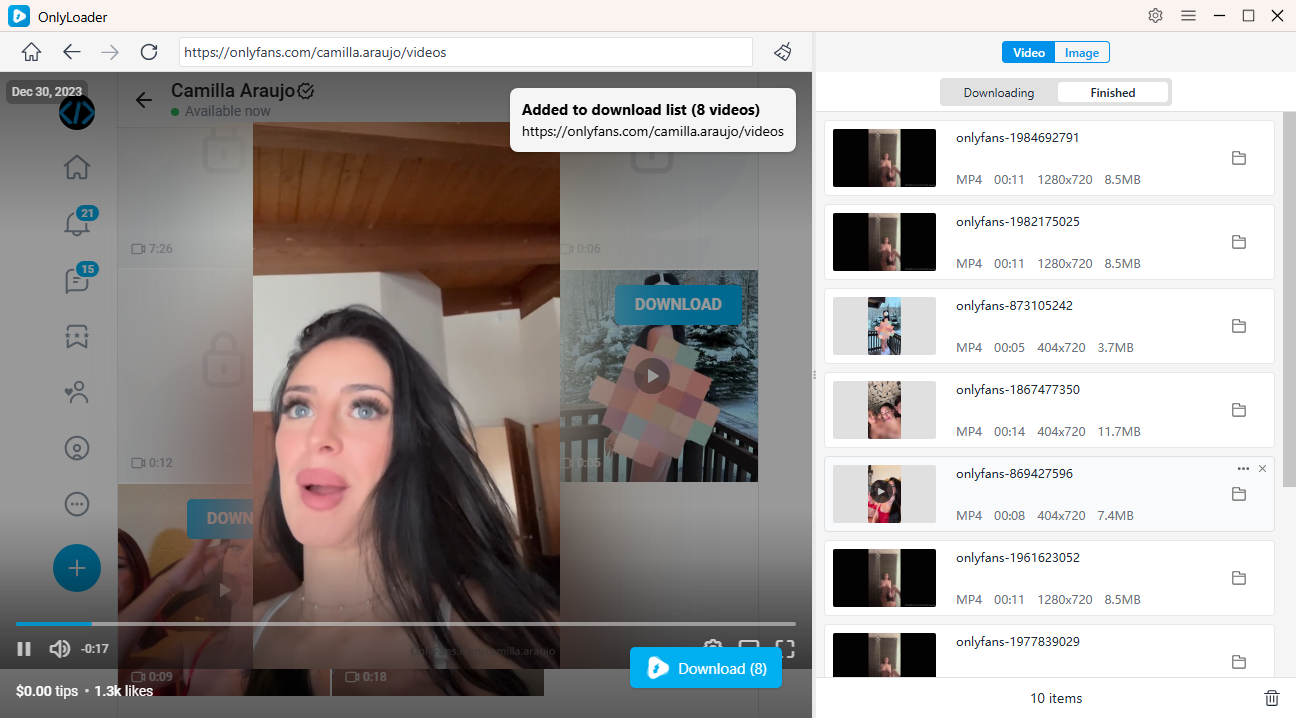
- Download videoer – Gå til fanen Videoer, afspil en video for at registrere alle, og vælg derefter individuelt eller Download alle.
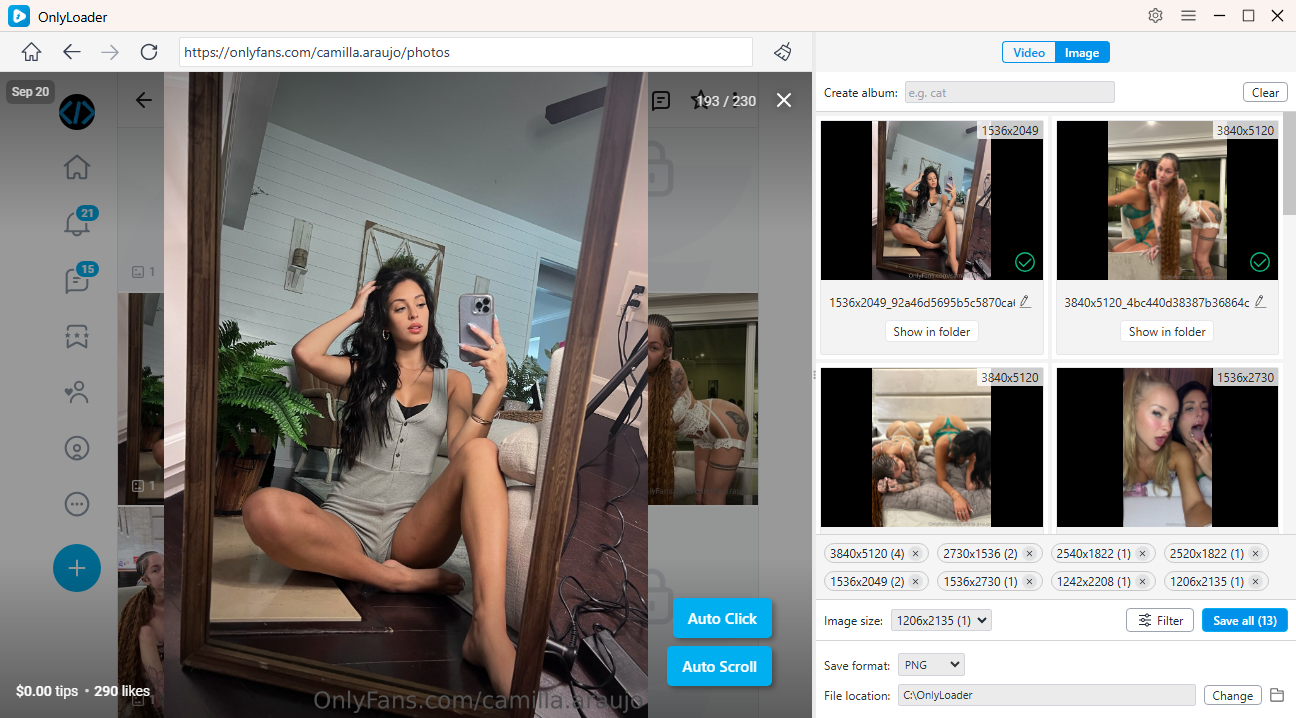
- Download fotos – Gå til fanen Fotos, indlæs automatisk billeder i fuld størrelse, og vælg derefter eller massedownload.
5. Konklusion
Det er ikke muligt at finde nogen på OnlyFans via telefonnummer, og denne begrænsning findes for at beskytte brugernes privatliv. OnlyFans-konti er beregnet til at blive fundet gennem offentlig markedsføring, ikke private personoplysninger. Hvis nogen ønsker at blive fundet, deler de normalt deres profil via sociale medier, brugernavne eller søgemaskiner.
Når du har fundet en skaber – eller hvis du administrerer dit eget OnlyFans-indhold – OnlyLoader skiller sig ud som en pålidelig og effektiv løsning. Dens evne til at downloade videoer og fotos i store mængder, bevare den originale kvalitet og forenkle indholdsorganiseringen gør den til et værdifuldt værktøj for både skabere og abonnenter.