 OnlyLoader
Quomodo pro OnlyFans Anonyme Solvere?

Secretum interretiale cura crescens multis usoribus digitalibus facta est, praesertim cum suggestis subscribuntur quae solutiones personales requirunt. OnlyFans usoribus permittit ut creatoribus auxilium ferant et contentis exclusivis accedant, sed quidam subscriptores malunt actiones suas solutionum a rationibus pecuniariis cotidianis et identitate personali separare.
Quamquam fortasse iucunda videatur notio solvendi pro OnlyFans omnino anonyme, systemata solutionum hodierna certos gradus verificationis et archivorum conservationis requirunt. Potius, usores in utendo modis solutionum secreto faventibus, informatione rationum suarum protegenda, et innecessaria divulgatione notitiarum personalium minuenda animum intendere possunt.
In hoc duce, modos practicos explorabimus ad secretum solutionum emendandum cum OnlyFans subscribis, explicabimus quae modi anonymitatem praebere possint et non possint, et modum commodum introducemus ad media subscripta servanda.

1. Quomodo pro OnlyFans Anonyme Solvere?
Quamquam OnlyFans validam rationem solutionis requirit, complures sunt modi ad quantitatem informationum personalium cum subscriptione tua coniunctarum minuendam.
1.1 Charta Praesoluta Utere
Una ex simplicissimis rationibus ad secretum addendum solutionibus interretialibus est per usum chartae praesolutae. Chartae praesolutae Visa vel Mastercard tibi permittunt ut certam pecuniae summam onerare et charta ad transactiones interretiales uti possis sine directa coniunctione chartae argentariae primariae tuae.
Commoda chartarum praesolutarum:
- Notitias principales chartae debiti vel crediti tuae privatas servat.
- Melius imperium in sumptibus permittit.
- Separationem inter res pecuniarias personales et subscriptiones interretiales creat.
- Post usum, pro genere chartae, abici vel reponi potest.
Antequam chartam praesolutam eligas, verifica eam cum mercatoribus interretialibus operari et transactiones trans fines permittere. Quaedam chartae praesolutae verificationem identitatis requirere possunt tempore emptionis vel activationis, ergo gradus secreti a praebitore chartae et legibus localibus pendent.
1.2 Chartam Virtualem Experire
Chartae virtuales alia optio sunt, quae ad secretum pertinet, pro solutionibus interretialibus. Similiter ac chartae debiti vel crediti regulares funguntur, sed numerum separatum chartae praebent, qui ad transactiones interretiales adhiberi potest.
Multae officia chartarum virtualum offerunt functiones tales ut:
- Numeri chartarum temporales.
- Limites impensarum.
- Facilis chartae substitutio.
- Protectio addita pro ratione tua solutionis primaria.
Usus chartae virtualis periculum patefaciendi principales informationes tuas pecuniarias minuere potest. Attamen, provisores chartarum virtualium fortasse adhuc informationes tuas personales colligunt dum rationem creas, quod significat secretum augere sed anonymitatem perfectam non praebere.
1.3 Rationem Solutionis Separatam Crea
Alia via ad secretum tuum protegendum est rationem solutionis dedicatam pro subscriptionibus interretialibus creare.
Exempli gratia, potes:
- Inscriptionem electronicam separatam utere.
- Solutiones subscriptionum a ratione argentaria tua quotidiana arce.
- Vitanda est coniunctio profilorum personalium vel rationum instrumentorum socialium.
- Utere singularibus documentis inscriptionis.
Separata ratio solutionum faciliorem reddit administrationem sumptuum interretialium et minuit periculum informationum personalium per multas suggestus coniungendarum.
1.4 Informationes Rationum Argentariarum Tuarum Recense
Etiam cum modis solutionis alternativis uteris, transactiones adhuc in historia solutionum tuarum apparere possunt. Nomen mercatoris vel processoris solutionum in extracto argentario tuo videri potest.
Antequam subscribas, haec verifica:
- Quomodo dator chartae tuae transactiones interretiales ostendit.
- Utrum descriptiones mercatorum nomen suggestus revelent.
- Utrum notificationes ad instrumenta communia an ad rationes electronicas mittantur.
Harum rerum administratio adiuvare potest ut melius secretum servetur.
2. Rationis Tuae OnlyFans Secretum Protege
Secretum solutionum tantum una pars est secreti in interreti manendi. Rationes tuae et consuetudines personales etiam valent.
Has consuetudines secreti considera:
- Inscriptionem electronicam separatam utere
Creando rationem electronicam dedicatam pro OnlyFans adiuvas ne actio subscriptionis tuae cum arca epistulari personali tua coniungatur.
- Authenticationem duorum factorum activare
Authenticatio duorum factorum stratum securitatis addit et adiuvat ad rationem aditum non auctorizatum prohibere.
- Vitanda est coniunctio rationum socialium personalium.
Noli rationem tuam OnlyFans cum imaginibus publicis quae veram identitatem tuam revelant coniungere, nisi tibi ea coniunctio placeat.
- Tesseras firmas utere
Tesseram singularem crea quae in aliis paginis interretialibus non iterum adhibeatur.
3. Donum: Subscription OnlyFans Media serva cum OnlyLoader
Postquam ad creatores se subscripserunt, quidam usores contenta, ad quae legitime accedere possunt, ordinare et servare volunt. Magnam collectionem manu administrare tempus multum consumere potest, praesertim cum multae imagines et pelliculae tractantur.
OnlyLoader Instrumentum est ad administrationem mediorum destinatum ad adiuvandos usores contenta interretialia efficacius servanda et ordinanda. Cum navigatro incluso et facultatibus deductionis per greges, usores media OnlyFans subscripta commodius administrare possunt.
Key features of OnlyLoader :
- Collectiones integras imaginum et pellicularum OnlyFans in magna copia detrahe.
- Navigatrum interretiale inclusum ad contenta creatorum subscriptorum accedendum.
- Imagines desideratas elige magnitudinem et genus filtrando.
- Imagines et videos qualitate originali et formis popularibus serva.
Quomodo OnlyFans Media cum [vel fortasse "OnlyFans Media") servare OnlyLoader :
- Install and start OnlyLoader in computatro tuo Windows vel Mac.
- Ini rationem tuam OnlyFans per navigatrum interretiale inclusum, deinde aperi profilem creatoris et percurre contenta subscripta praesto.
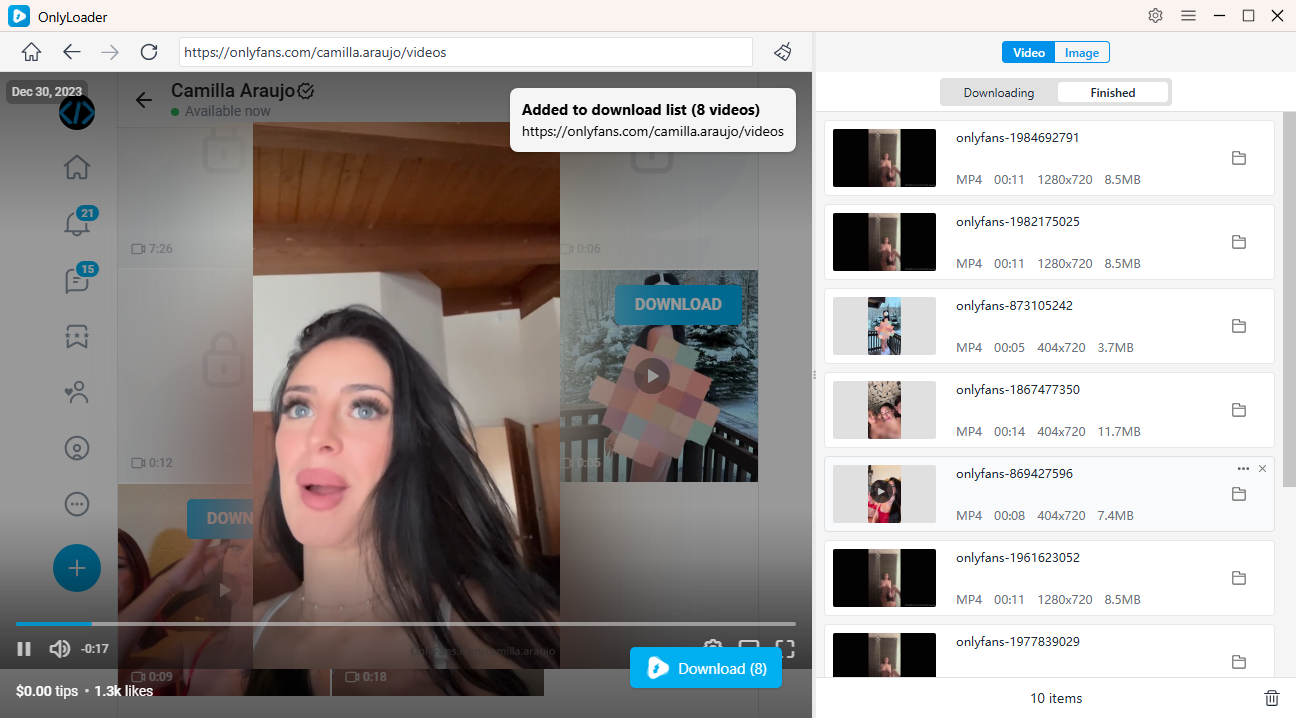
- Ad videos servandos, ad paginam "Videos" vade, contenta quae vis depromere lude, et bullam "Download" preme. OnlyLoader videos praesto automatice deteget et te plura fascicula simul detrahere sinet.
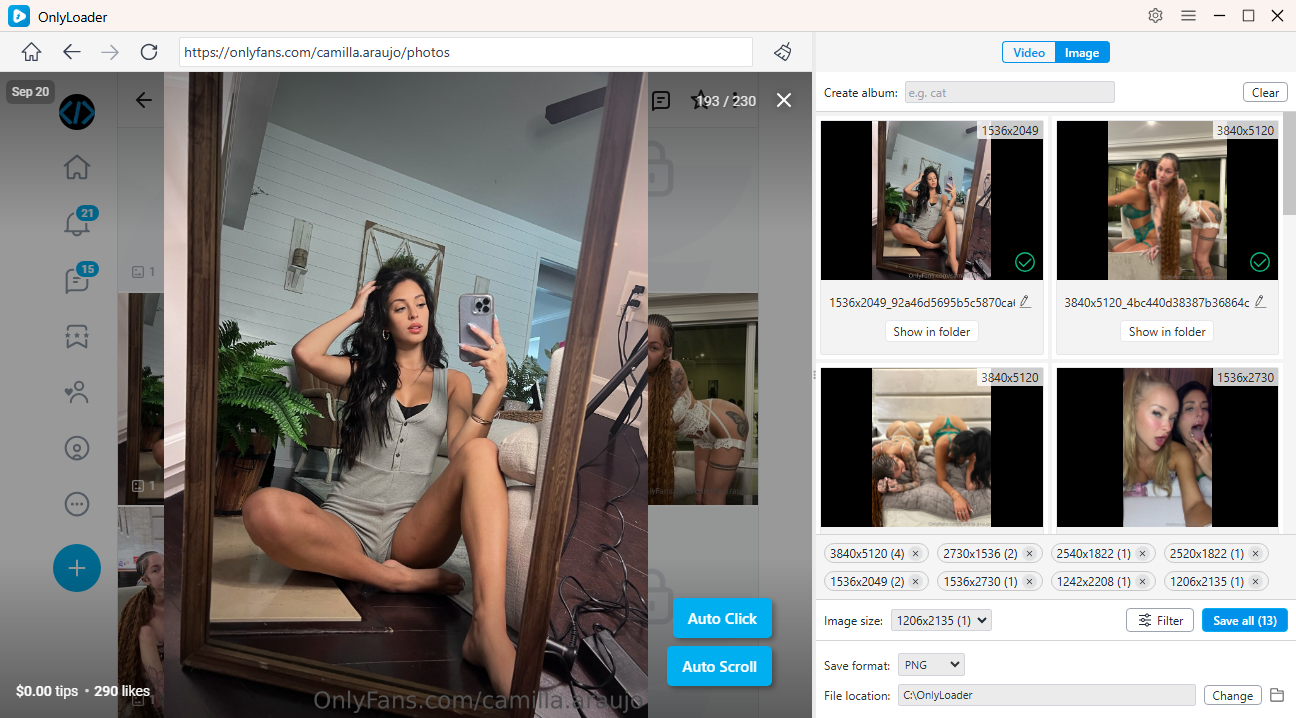
- Ad imagines detrahendas, functionem "Auto-Click" (vel "Click Automaticum") activa ut imagines ex pagina sponte detegat et extrahat. Imagines quas vis elige et plura fascicula uno grege detrahe.
4. conclusio
Pecuniam pro OnlyFans sine nomine solvere non omnino fieri potest, quia societates solutionum et suggesta acta transactionum conservare debent. Attamen, usores secretum suum augere possunt per methodos solutionum separatas, chartas praesolutas, chartas virtuales, et rationes dedicatas, dum bonas rationes securitatis interretialis sequuntur.
Usoribus qui contenta subscripta ordinare volunt, OnlyLoader Modum commodum praebet ad administranda et servanda media OnlyFans accessibilia. Cum functionibus ut receptio per seriem, detectio automatica, et administratio contentorum simplex, OnlyLoader ordinationem mediorum personalium faciliorem et efficaciorem reddere potest.
- Videos OnlyFans Non Ludunt? Has Remedia Tenta.
- Quomodo OnlyFans inscriptionem cum X solvere possum si inscriptionem electronicam mutare non possum?
- Quomodo Cat-Catch Utaris ad Deponenda Videos OnlyFans DRM
- Optimi Inventores OnlyFans per Imaginem ad Profila Investiganda
- Quomodo Kirstentoosweet OnlyFans Media Depromere?
- Quale est nomen OnlyFans in extracto argentario?
- Videos OnlyFans Non Ludunt? Has Remedia Tenta.
- Quomodo OnlyFans inscriptionem cum X solvere possum si inscriptionem electronicam mutare non possum?
- Quomodo Cat-Catch Utaris ad Deponenda Videos OnlyFans DRM
- Optimi Inventores OnlyFans per Imaginem ad Profila Investiganda
- Quomodo Kirstentoosweet OnlyFans Media Depromere?
- Quale est nomen OnlyFans in extracto argentario?
- Dux Completus de Modo Stipendium in OnlyFans Dare