 OnlyLoader
Sidee looga dhigi karaa Akoonkaaga OnlyFans mid firfircoon?

Hadday tahay inaad ku biireyso OnlyFans abuure ahaan ama aad iska diiwaan gelineyso abuureyaasha aad ugu jeceshahay taageere ahaan, lahaanshaha akoon firfircoon ayaa lagama maarmaan u ah helitaanka dhammaan sifooyinka madal. Abuurayaasha, kicinta macnaheedu waa dhammaystirka xaqiijinta aqoonsiga, dejinta macluumaadka lacag bixinta, iyo daabacaadda waxyaabaha ku jira si boggaagu u muuqdo. Isticmaalayaasha jira waxay sidoo kale u baahan karaan inay soo ceshadaan akoon aan shaqeyn ama aan shaqeynin, halka macaamiishu mararka qaarkood u baahan yihiin inay xalliyaan arrimaha lacag bixinta si ay dib ugu soo celiyaan marin u helka.
Tilmaamahan wuxuu sharxayaa sida loo hawlgeliyo akoon cusub oo abuure ah, loo soo ceshado akoon aan firfircoonayn, loona hagaajiyo arrimaha la xiriira rukunka. Ugu dambeyntii, waxaan sidoo kale soo bandhigi doonnaa qalab ku habboon soo dejinta warbaahinta OnlyFans si loogu daawado offline-ka iyo abaabul shaqsiyeed.
1. Sidee looga dhigi karaa Akoonkaaga OnlyFans mid firfircoon?
Tallaabooyinka lagu hawlgelinayo akoonka OnlyFans waxay ku xiran yihiin inaad tahay abuure cusub, isticmaale soo laabanaya, ama macaamiil la kulma dhibaatooyin lacag bixin ah.
1.1 Abuurayaasha Cusub: Dhaqaaji Akoonkaaga Abuuraha
Haddii aad dhawaan iska diiwaangelisay abuure ahaan, akoonkaagu si buuxda uma shaqayn doono ilaa aad dhammaystirto shuruudaha xaqiijinta iyo dejinta lacag bixinta ee goobta.
- Samee Akoon OnlyFans ah: Isku qor adoo isticmaalaya cinwaanka emailkaaga, akoonkaaga Google, ama X (oo hore loogu yiqiin Twitter). Xaqiiji emailkaaga haddii la codsado.
- Xaqiijinta Aqoonsiga oo Dhameystiran: Tag Xaqiijinta ama Ku dar Bangiga qayb ka mid ah oo soo gudbi aqoonsi ay dawladdu soo saartay oo ay weheliso sawir selfie ah oo wata aqoonsiga. Ansixintu badanaa waxay qaadataa 24–48 saacadood .
- Ku dar Habka Lacag Bixintaada: Geli akoonkaaga bangiga ama hab kale oo lacag bixin ah si aad u hesho dakhli. Hubi in dhammaan faahfaahinta lacag bixinta ay sax yihiin.
- Daabac Mawduuca Hore: Soo rar 5–10 sawir ama fiidiyowyo si aad boggaaga uga dhigto mid dhammaystiran oo diyaar u ah macaamiisha suurtagalka ah.
- Deji Qiimaha Isdiiwaangelintaada: Dooro khidmad isdiiwaangelin bille ah ama ka dhig boggaaga mid bilaash ah oo lacag ku hel lacag bixin-arag-kasta (PPV) macluumaadka, talooyinka, ama codsiyada gaarka ah.
1.2 Isticmaalayaasha Soo Celinaya: Soo Celi Akoon aan Firfircoonayn ama La Joojiyay
Haddii aad hore u isticmaashay OnlyFans laakiin akoonkaagu aanu shaqaynayn, la hakiyey, ama la damiyey, waxaa jira dhowr siyaabood oo aad dib ugu soo celin karto marin u helidda.
Isku day inaad gasho
Haddii akoonkaagu uu si fudud u hurday, ku soo galitaanka magacaaga isticmaalaha iyo eraygaaga sirta ah ayaa si toos ah dib ugu hawlgelin kara.
Haddii aad xasuusato aqoonsigaaga, kani waa xalka ugu dhaqsaha badan.
Hubi Iimaylkaaga
Ka raadi sanduuqaaga emayllada ka imanaya OnlyFans.
Waxaa laga yaabaa inaad hesho farriimo sharraxaya sababta akoonkaagu u noqday mid aan firfircoonayn ama bixinaya tilmaamo sida:
- Nadiifinta kaydka biraawsarkaaga iyo cookies-kaaga
- Dib u dejinta eraygaaga sirta ah
- Dhammaystirka xaqiijinta dheeraadka ah
- Rafcaan ka qaadashada xayiraad la xiriirta siyaasadda
Raacitaanka tilmaamaha ku jira emaylladan ayaa inta badan xalliya arrinta.
La xidhiidh Taageerada Taageereyaasha Keliya
Haddii aadan geli karin akoonkaaga ama aad aaminsan tahay in si qalad ah loo damiyay, la xiriir Taageerada OnlyFans.
Ku dar:
- Magaca isticmaalahaaga
- Iimaylka la xiriira akoonkaaga
- Sharaxaad kooban oo ku saabsan dhibaatada
Bixinta macluumaad dhammaystiran waxay ka caawisaa kooxda taageerada inay si hufan u baaraan codsigaaga.
1.3 Macaamiisha: Hagaaji Rukun aan Firfircoonayn
Mararka qaar akoonka OnlyFans wuxuu u muuqdaa mid aan firfircoonayn sababtoo ah lacag bixinta rukunka lama socodsiin karin.
Cusbooneysii Habkaaga Lacag-bixinta
Fur dejimaha akoonkaaga oo dib u eeg hababka lacag bixinta ee aad kaydsatay.
Haddii lacag bixintaadii hore ay ku guuldareysatay:
- Cusboonaysii macluumaadka kaarkaaga
- Ku dar Visa ama Mastercard cusub oo la taageerayo
- Ka saar hababka lacag bixinta ee dhacay
Macluumaadka biilasha khaldan waa mid ka mid ah sababaha ugu badan ee keena rukumada aan firfircoonayn.
Sug inta ay Socoto Habaynta Lacag-bixinta
Markaad cusbooneysiiso faahfaahinta lacag bixintaada, OnlyFans caadiyan waxay qaadataa 24–48 saacadood si aad u socodsiiso lacag bixinta oo aad dib ugu soo celiso rukunkaaga.
Inta lagu jiro muddadan, iska ilaali inaad si isdaba joog ah u gudbiso isku dayo badan oo lacag bixin ah, maadaama tani ay kicin karto hubinno amni oo dheeraad ah.
2. Gunno: Dufcad Soo dejiso OnlyFans Media oo leh OnlyLoader
Haddii aad tahay macaamiil OnlyFans ah oo doonaya inuu keydiyo waxyaabaha la iibsaday si loogu daawado offline-ka ama uu haysto kayd shaqsiyeed marka loo ogolaado, OnlyLoader waxay bixisaa xal fudud oo hufan.
Astaamaha ugu muhiimsan waxaa ka mid ah:
- Soo dejinta dufcaddii sawirrada iyo fiidiyowyada OnlyFans
- Ilaalinta tayada warbaahinta asalka ah markasta oo la heli karo
- Taageer shaandhaynta sawirrada cabbir iyo nooc ahaan
- U dhoofi warbaahinta qaab MP4/PNG caan ah iyo qaabab asal ah
Isticmaalka OnlyLoader waxay qaadataa dhowr tillaabo oo keliya:
- Ku rakib oo bilow OnlyLoader Ku gal akoonkaaga OnlyFans PC ama Mac ee Windows-ka, ka dibna gal akoonkaaga OnlyFans adigoo adeegsanaya biraawsarka ku dhex jira.
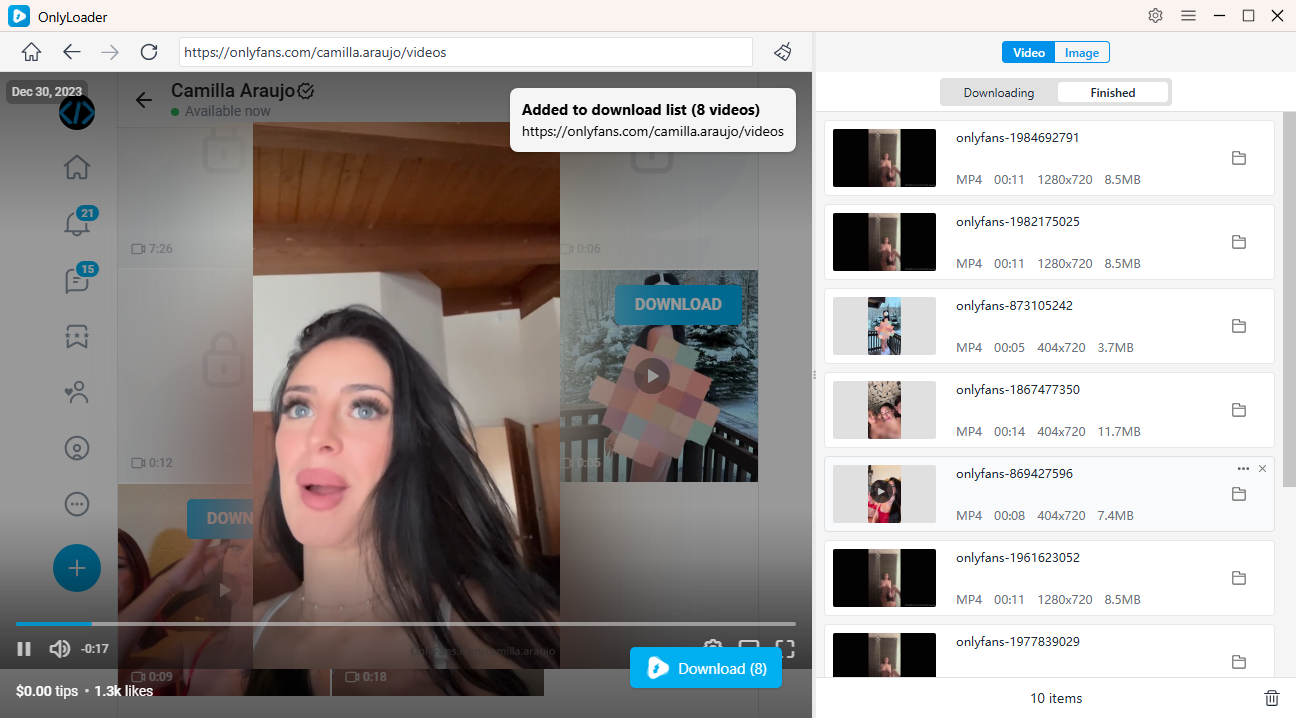
- Fur bogga abuuraha, u gudub bogga Muuqaalo tab, daar muuqaal kasta, oo guji Download . OnlyLoader si toos ah ayuu u ogaan doonaa dhammaan fiidiyowyada la heli karo ee loogu talagalay soo dejinta dufcadda.
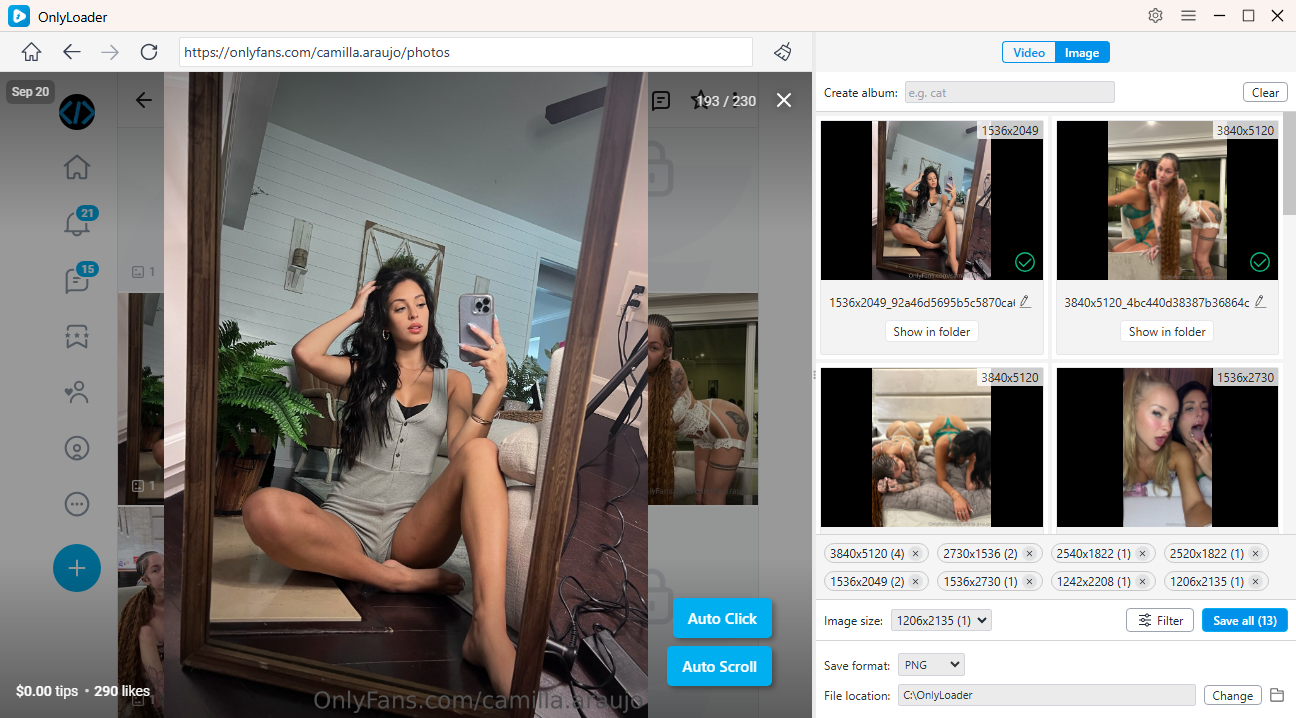
- Daar Guji otomaatiga ah si aad si toos ah ugu shubto macluumaadka bogga, aad u doorato sawirrada aad rabto, oo aad wax walba ugu soo dejiso hal dufcad.
3. Gabagabo
Furitaanka akoonka OnlyFans waxay ku xiran tahay doorkaaga ku jira madal. Abuurayaasha cusub waxay u baahan yihiin inay dhammaystiraan xaqiijinta aqoonsiga, ku daraan habka lacag bixinta, daabacaan macluumaadka bilowga ah, iyo inay habeeyaan qiimaha rukunka ka hor inta akoonnadoodu si buuxda u firfircoonaadaan. Isticmaalayaasha soo laabanaya badanaa waxay soo ceshan karaan akoonnada aan firfircoonayn iyagoo galaya, raacaya tilmaamaha ay soo direen OnlyFans, ama la xiriiraya taageerada macaamiisha. Macaamiisha la kulma xubinnimada aan firfircoonayn waa inay dib u eegaan oo cusbooneysiiyaan macluumaadkooda lacag bixinta, ka dibna u oggolaadaan waqti xaqiijinta lacag bixinta.
Marka akoonkaagu firfircoonaado, ilaalinta boggaaga, u hoggaansanaanta siyaasadaha madal, iyo ku sii jiridda firfircoonida waxay kaa caawin doontaa inaad hubiso marin aan kala go 'lahayn. Haddii aad raadinayso hab ku habboon oo aad ku abaabuli karto warbaahintaada OnlyFans ee aad iibsatay si aad u daawato offline ama aad u kaydsato shaqsi ahaan, OnlyLoader waxay bixisaa xal wax ku ool ah oo soo dejinta dufcad.
- How to Use Cat-Catch to Download DRM OnlyFans Videos
- Best OnlyFans Finders by Image to Search Profiles
- How to Download Kirstentoosweet OnlyFans Media?
- Maxay Taageerayaasha Kaliya Ka Muuqdaan Sida Bayaanka Bangiga?
- Tilmaame Dhammaystiran oo ku saabsan Sida Loogu Talo Bixiyo OnlyFans
- Sidee Looga Sameeyaa $100 Maalintii OnlyFans?
- How to Use Cat-Catch to Download DRM OnlyFans Videos
- Best OnlyFans Finders by Image to Search Profiles
- How to Download Kirstentoosweet OnlyFans Media?
- Maxay Taageerayaasha Kaliya Ka Muuqdaan Sida Bayaanka Bangiga?
- Tilmaame Dhammaystiran oo ku saabsan Sida Loogu Talo Bixiyo OnlyFans
- Sidee Looga Sameeyaa $100 Maalintii OnlyFans?
- Sidee Loo Bixiyaa Lacag-bixinta KaliyaFans Si Qarsoodi Ah?