 OnlyLoader
Ինչպե՞ս օգտագործել KeepStreams-ը OnlyFans-ից ներբեռնումներ կատարելու համար։

OnlyFans-ը դարձել է լայնորեն օգտագործվող բաժանորդագրության վրա հիմնված հարթակ, որտեղ ստեղծողները կիսվում են բացառիկ լուսանկարներով և տեսանյութերով իրենց վճարովի բաժանորդների հետ: Քանի որ օգտատերերը հետևում են մի քանի ստեղծողների, նրանք հաճախ ցանկանում են հարմար միջոց գտնել բովանդակությունը պահպանելու կամ կազմակերպելու համար՝ անցանց դիտելու համար: Ահա թե որտեղ են գործի դրվում KeepStreams-ի նման գործիքները:
KeepStreams-ը մեդիա ներբեռնման գործիք է, որը նախատեսված է օգտատերերին օգնելու պահպանել տարբեր հարթակներից հոսքային տեսանյութեր: Չնայած այն հաճախ քննարկվում է OnlyFans-ի նման բաժանորդագրության վրա հիմնված կայքերի հետ կապված, կարևոր է նշել, որ ցանկացած ներբեռնում պետք է կատարվի միայն այն բովանդակության համար, որին դուք օրինական մուտք ունեք և համաձայն հարթակի կանոնների և հեղինակային իրավունքի մասին օրենքների:
Այս ուղեցույցում մենք կբացատրենք, թե ինչ է KeepStreams-ը, ինչպես է այն աշխատում, ինչպես օգտագործել այն OnlyFans-ի հասանելի բովանդակությունը ներբեռնելու համար, դրա գները, ինչպես նաև կհամեմատենք դրա առավելություններն ու թերությունները։
1. Ի՞նչ է KeepStreams-ը։
KeepStreams-ը համակարգչային ծրագիր է, որը թույլ է տալիս օգտատերերին ներբեռնել տեսանյութեր աջակցվող հոսքային հարթակներից: Այն նախագծված է ներկառուցված զննարկիչով, որը կարող է հայտնաբերել նվագարկելի մեդիա ֆայլերը և հոսքային բովանդակությունը վերածել ներբեռնելի ֆայլերի:
Հիմնական առանձնահատկությունները սովորաբար ներառում են.
- Ներկառուցված վեբ զննարկիչ հոսքային կայքերի համար
- Տեսանյութի որակի ընտրություն (կախված աղբյուրի առկայությունից)
- Խմբային ներբեռնման աջակցություն
- Ենթագրերի և մետատվյալների պահպանում (աջակցվող հարթակներում)
- Տեսանյութերի հոսքերի ավտոմատ հայտնաբերում
2. Ինչպես օգտագործել KeepStreams-ը OnlyFans-ից ներբեռնելու համար
KeepStreams-ը OnlyFans-ից ներբեռնելու համար օգտագործելը համեմատաբար պարզ է, հատկապես, եթե դուք արդեն բաժանորդագրված եք creators-ին և բովանդակությանը մուտք եք գործում ձեր հաշվի միջոցով։
Ահա ընդհանուր քայլ առ քայլ գործընթաց.
Քայլ 1. Ներբեռնեք և տեղադրեք KeepStreams for Onlyfans-ը ձեր Windows կամ Mac համակարգչի վրա: Տեղադրումից հետո գործարկեք ծրագիրը:
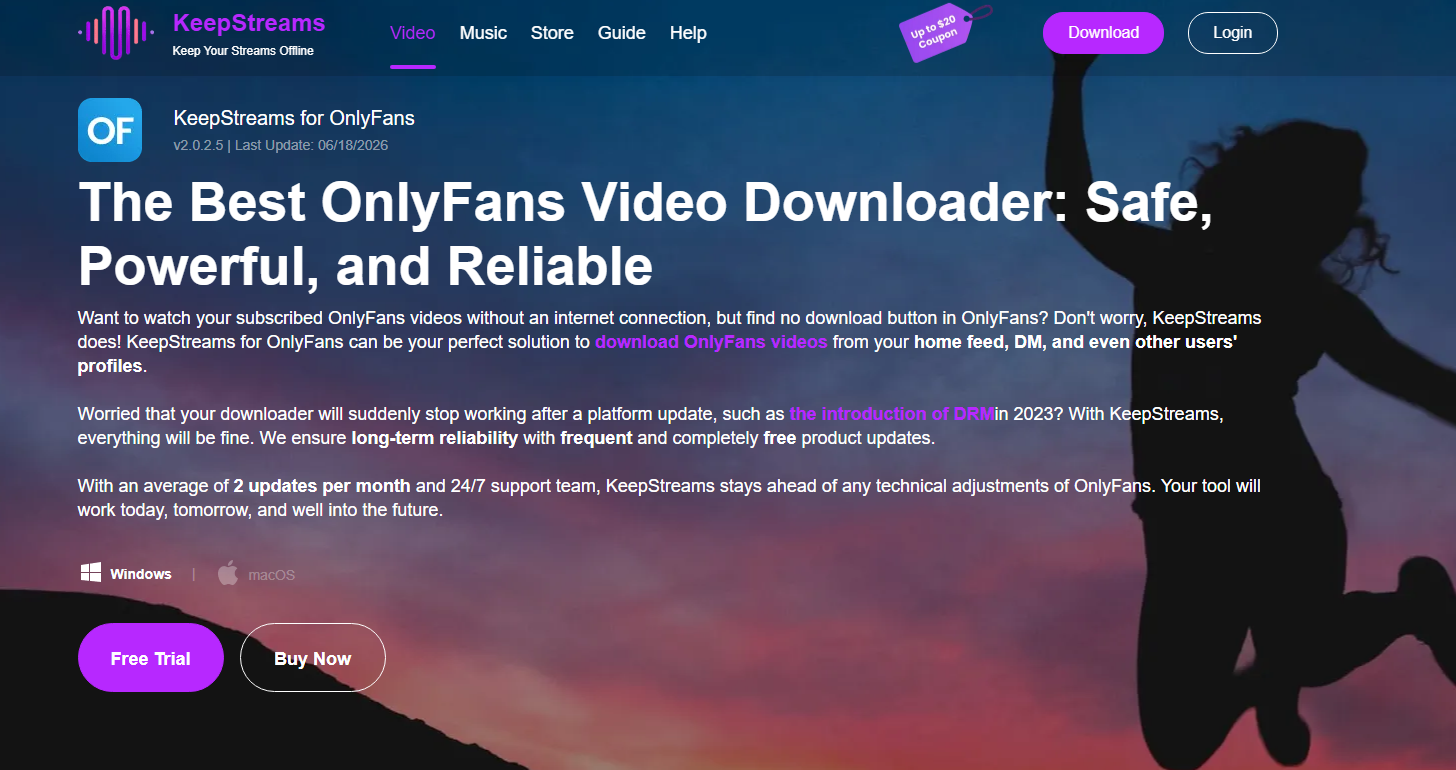
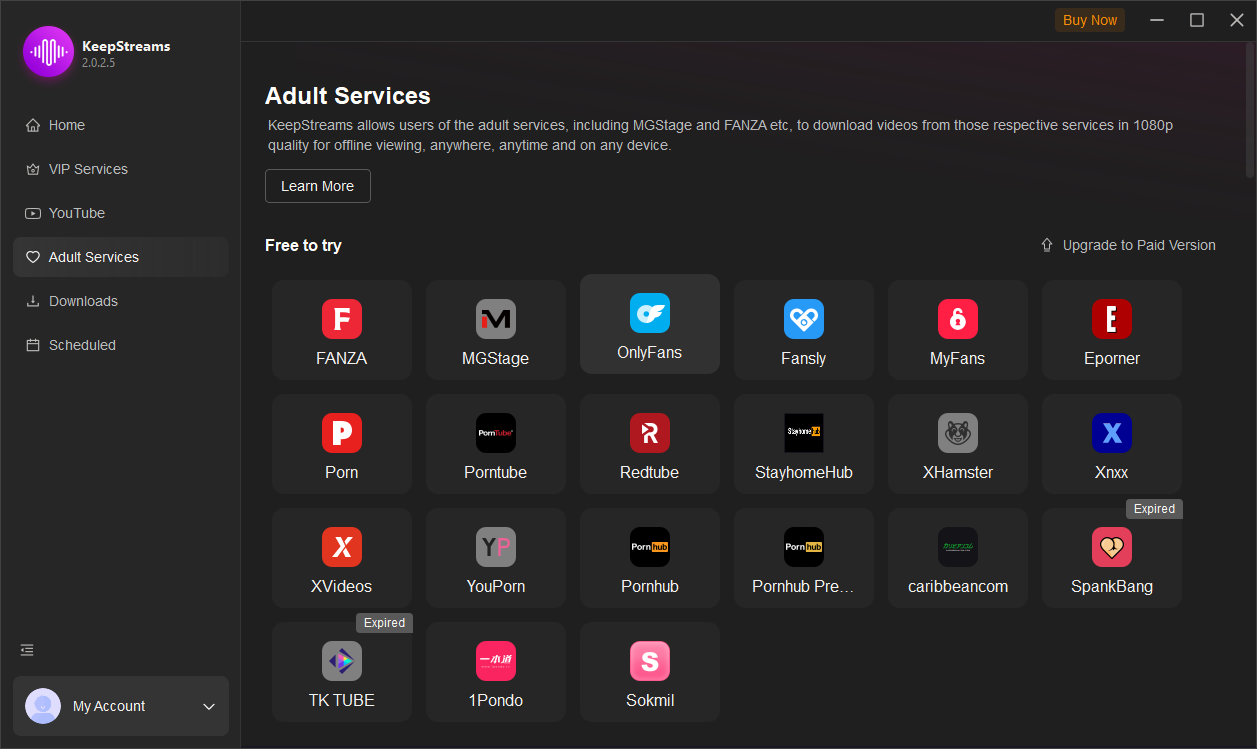
Քայլ 2։ Սեղմեք «Մեծահասակների ծառայություններ» կոճակը և սեղմեք OnlyFans պատկերակի վրա, այնուհետև անցեք OnlyFans կայք և մուտք գործեք ձեր OnlyFans մուտքի տվյալներով։
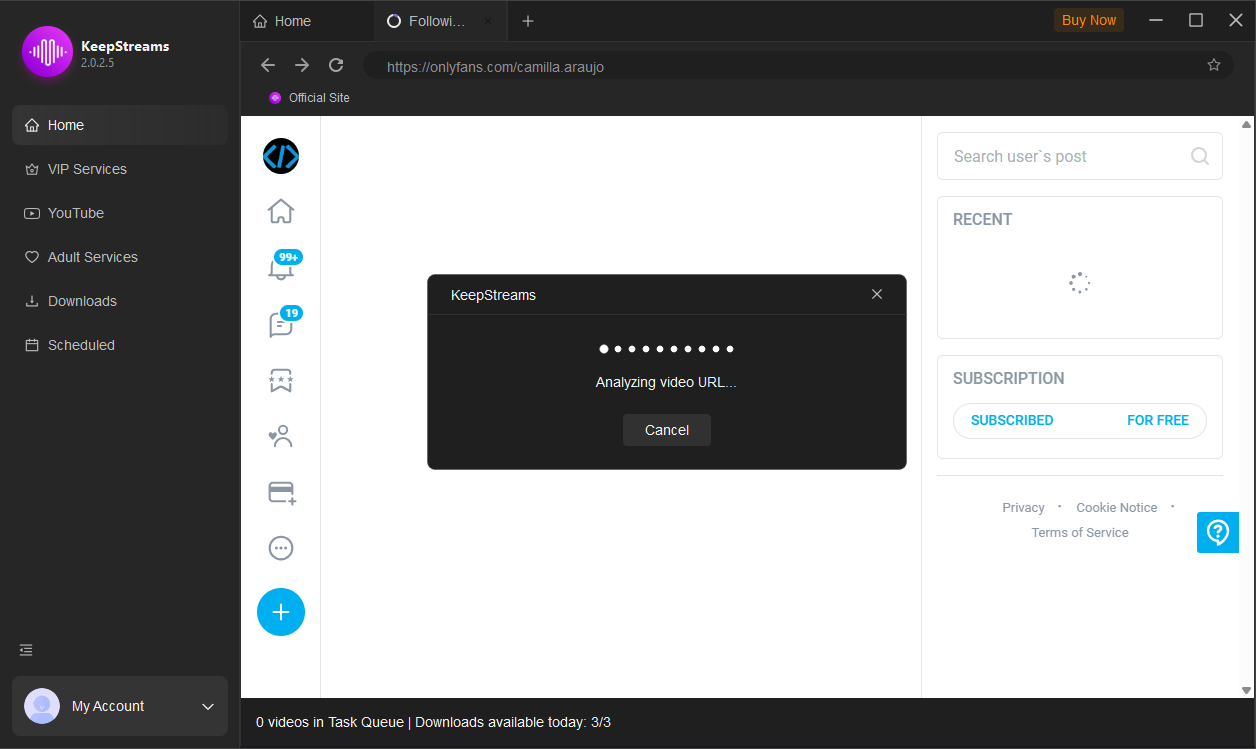
Քայլ 3. Բացեք այն ստեղծողի էջը, որի բովանդակությունը ցանկանում եք դիտել կամ պահպանել, այնուհետև KeepStreams-ը ավտոմատ կերպով կհայտնաբերի մեդիա ֆայլերը և կցուցադրի ներբեռնման տարբերակների ցանկ:
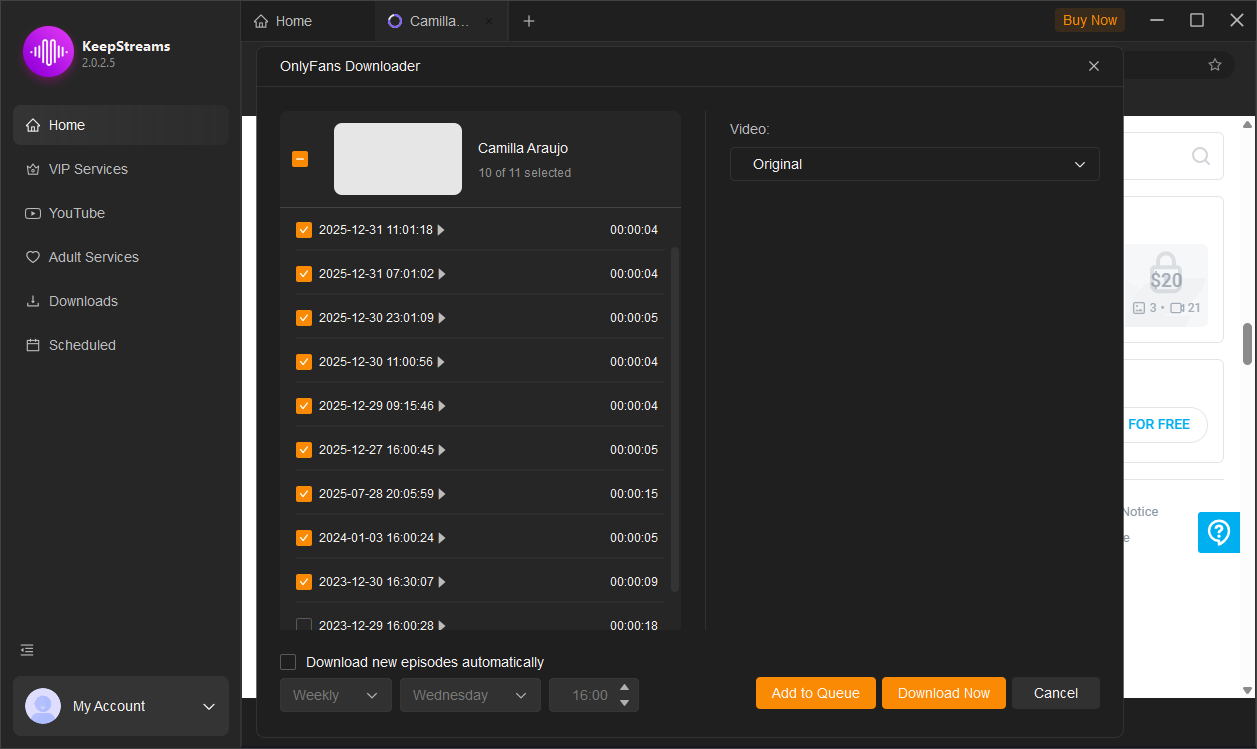
Քայլ 4: Ընտրեք տեսանյութեր և որակ, այնուհետև ներբեռնեք դրանք ձեր ընտրած ելքային թղթապանակում:
3. KeepStreams-ի գնագոյացում
KeepStreams-ը գործում է բաժանորդագրության վրա հիմնված մոդելով և չի առաջարկում առանձին պլան OnlyFans-ի ներբեռնման համար: Դրա փոխարեն, բոլոր գործառույթները ներառված են միասնական պլանի ներքո, որը ներառում է տարբեր հարթակներում աջակցվող 40+ տեսանյութերի ներբեռնման մոդուլներ:
Դրա գնագոյացման կառուցվածքը սովորաբար ներառում է.
- Ամսական պլան՝ $69.99
Ներառում է բոլոր 40+ տեսանյութերի ներբեռնիչների հասանելիություն 1 ամսվա օգտագործման դեպքում։ - Տարեկան պլան՝ $169.99
Ներառում է 40+ ներբեռնիչների ամբողջական փաթեթի լիարժեք հասանելիություն 1 տարվա ընթացքում՝ առաջարկելով ավելի լավ արժեք երկարաժամկետ օգտատերերի համար։ - Կյանքի լիցենզիա – $269.99
Միանվագ վճարում՝ բոլոր աջակցվող տեսանյութերի ներբեռնիչներին և ապագա թարմացումներին ցմահ մուտք գործելու համար։
4. KeepStreams-ի դրական և բացասական կողմերը
Կողմերը:
- Աջակցում է բազմաթիվ հոսքային հարթակներ մեկ գործիքում
- Ներկառուցված զննարկիչը պարզեցնում է մուտքը և հայտնաբերումը
- Բազմաթիվ ֆայլերի խմբաքանակային ներբեռնման գործառույթ
Դեմ:
- Համեմատաբար թանկ է միանգամյա օգտագործման գործիքների համեմատ
- Մասնագիտացված չէ OnlyFans-ի կամ կոնկրետ ստեղծագործական հարթակների համար
- Արդյունավետությունը կարող է տարբեր լինել՝ կախված հարթակի փոփոխություններից
- Աջակցում է միայն տեսանյութերի ներբեռնմանը
5. Փորձեք OnlyLoader KeepStreams-ի փոխարեն
Թեև KeepStreams-ը առաջարկում է լայն գործիքակազմ բազմաթիվ հոսքային հարթակներից ներբեռնելու համար, շատ օգտատերեր նախընտրում են ավելի կենտրոնացված և արդյունավետ լուծում։ OnlyLoader OnlyFans տեսանյութերի և պատկերների պրոֆեսիոնալ զանգվածային ներբեռնիչ է, որը նախատեսված է բաժանորդագրության վրա հիմնված բովանդակությունը մեծածավալ կերպով մշակելու համար։
Ինչո՞ւ OnlyLoader ավելի լավ տարբերակ է: :(
- OnlyFans-ի ստեղծողների էջերից տեսանյութերի և պատկերների զանգվածային ներբեռնում վայրկյանների ընթացքում
- Հնարավորության դեպքում արդյունահանեք և ներբեռնեք մեդիա բնօրինակ որակը
- Ֆիլտրեք լուսանկարները ըստ տեսակի, չափի և լուծաչափի
- Արտահանեք մեդիա ֆայլերը MP4, JPG կամ PNG ձևաչափերով
- Աշխատում է սահուն Windows-ում և Mac-ում
Ինչպես օգտագործել OnlyLoader :
- Տեղադրել OnlyLoader ձեր Windows կամ Mac համակարգչի վրա և գործարկեք ծրագիրը:
- Մուտք գործեք OnlyFans՝ օգտագործելով ներկառուցված զննարկիչը և մուտք գործեք ձեր բաժանորդագրված ստեղծողի էջ։
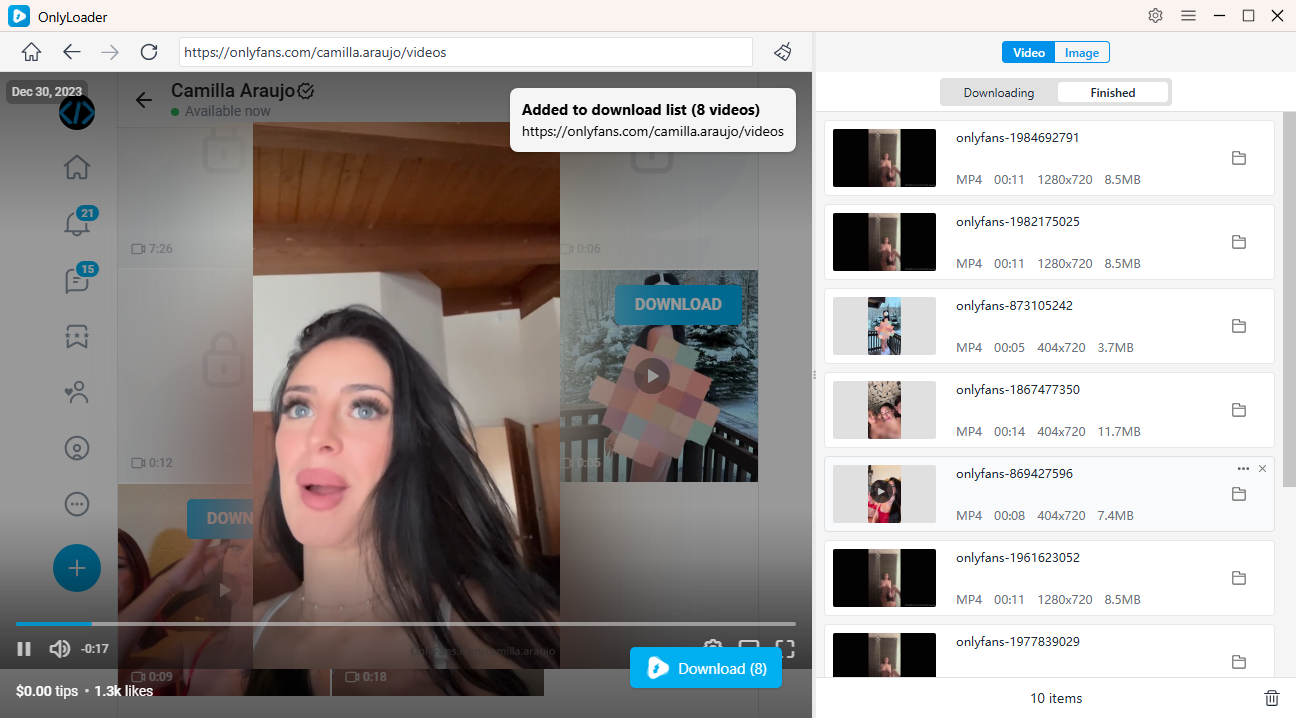
- Նվագարկեք տեսանյութը «Տեսանյութեր» ներդիրում, սեղմեք «Ներբեռնել» և OnlyLoader ավտոմատ կերպով կհայտնաբերի բոլոր հասանելի տեսանյութերը, որպեսզի դուք կարողանաք ընտրել ձեզ անհրաժեշտները և մեծ քանակությամբ ներբեռնել դրանք։
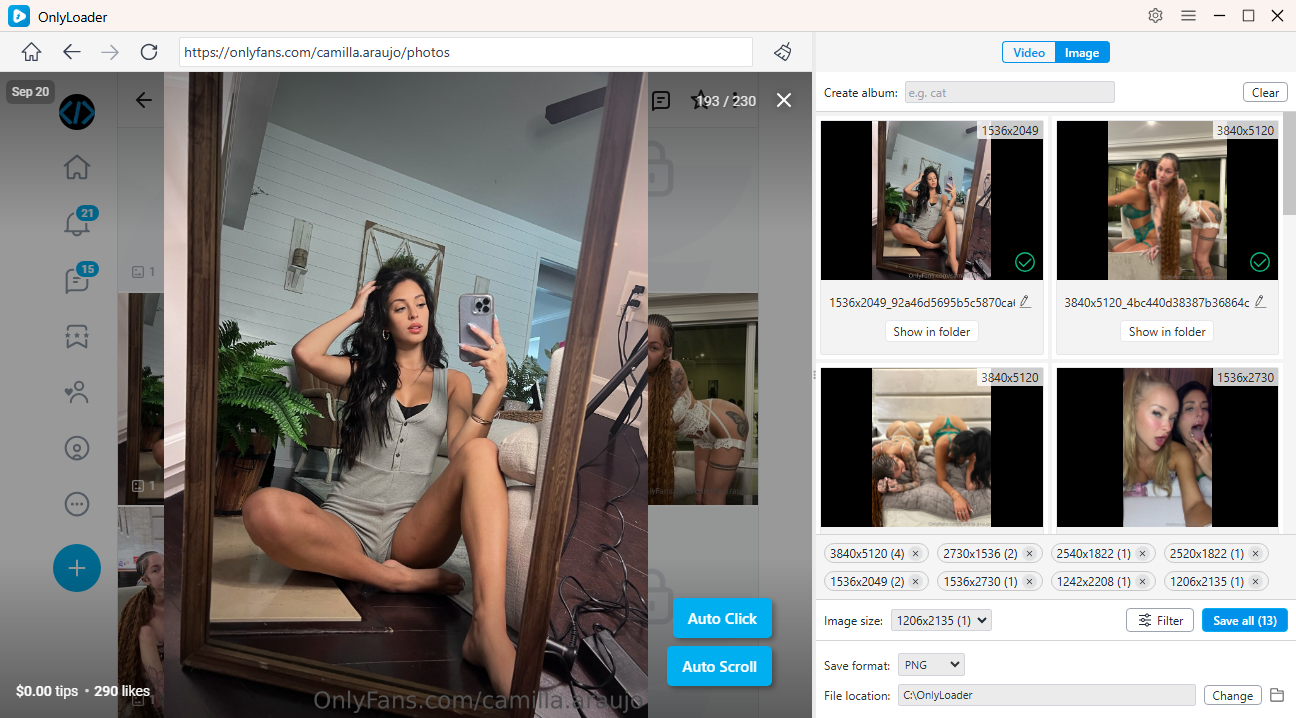
- OnlyFans-ի լուսանկարները ներբեռնելու համար միացրեք OnlyLoader -ի ավտոմատ սեղմման գործառույթը՝ ստեղծողի պրոֆիլի նկարները ավտոմատ կերպով բացելու համար: Երբ լուսանկարները լիովին բեռնվեն, կարող եք զտել ձեզ անհրաժեշտները և ներբեռնել ամեն ինչ մեկ խմբաքանակով՝ մեկ սեղմումով:
OnlyLoader առաջարկում է ավելի մատչելի բաժանորդագրության պլաններ KeepStreams-ի համեմատ, ինչը այն դարձնում է ավելի մատչելի ընտրություն այն օգտատերերի համար, ովքեր ցանկանում են ունենալ OnlyFans-ի նվիրված ներբեռնիչ՝ լիարժեք հնարավորություններով և ավելի ցածր գնով։
OnlyLoader Գնագոյացում՝
- 1-ամսյա պլան – $9.95 (OnlyFans մեդիայի անսահմանափակ ներբեռնումներ / 1 ամսվա մուտք դեպի OnlyLoader )
- 3-ամսյա պլան – $19.95 (OnlyFans մեդիայի անսահմանափակ ներբեռնումներ / 3 ամսվա մուտք դեպի OnlyLoader )
- 1 տարվա պլան – $29.95 (OnlyFans մեդիայի անսահմանափակ ներբեռնումներ / 1 տարվա մուտք դեպի OnlyLoader )
- Կյանքի ընթացքում պլան – $59.95 (OnlyFans մեդիայի անսահմանափակ ներբեռնումներ / ցմահ մուտք դեպի OnlyLoader )
6. Եզրակացություն
KeepStreams-ը հզոր, բազմաֆունկցիոնալ ներբեռնիչ է, որը աջակցում է հոսքային հարթակների լայն շրջանակ մեկ բաժանորդագրության պլանի շրջանակներում: Այն ապահովում է այնպիսի գործառույթներ, ինչպիսիք են ներկառուցված դիտարկիչը, ավտոմատ մեդիա հայտնաբերումը և խմբային ներբեռնումը, ինչը այն դարձնում է բազմակողմանի տարբերակ ընդհանուր հոսքային ներբեռնումների համար:
Սակայն, քանի որ այն նախատեսված է բազմաթիվ հարթակների համար, OnlyFans-ի բովանդակության կառավարման համար օգտագործելիս այն կարող է պակաս մասնագիտացված թվալ։
Ի տարբերություն դրա, OnlyLoader Մշակված է հատուկ OnlyFans տեսանյութերի և պատկերների զանգվածային ներբեռնումների համար՝ բարելավված կատարողականությամբ և ավելի արդյունավետ աշխատանքային հոսքով։
Օգտատերերի համար, ովքեր առաջնահերթություն են տալիս արդյունավետությանը, զանգվածային ներբեռնմանը և OnlyFans բովանդակության համար հատուկ մշակված փորձառությանը, OnlyLoader KeepStreams-ի համեմատ ավելի ուժեղ և գործնական ընտրություն է։
- Best OnlyFans Finders by Image to Search Profiles
- How to Download Kirstentoosweet OnlyFans Media?
- Ի՞նչ է ցույց տալիս OnlyFans-ը բանկային հաշվի քաղվածքում։
- Ամբողջական ուղեցույց՝ OnlyFans-ում թեյավճար տալու վերաբերյալ
- Ինչպե՞ս օրական 100 դոլար վաստակել OnlyFans-ում։
- Ինչպե՞ս անանուն վճարել OnlyFans-ի համար։
- Best OnlyFans Finders by Image to Search Profiles
- How to Download Kirstentoosweet OnlyFans Media?
- Ի՞նչ է ցույց տալիս OnlyFans-ը բանկային հաշվի քաղվածքում։
- Ամբողջական ուղեցույց՝ OnlyFans-ում թեյավճար տալու վերաբերյալ
- Ինչպե՞ս օրական 100 դոլար վաստակել OnlyFans-ում։
- Ինչպե՞ս անանուն վճարել OnlyFans-ի համար։
- OnlyFans-ի տարիքային ստուգման ամբողջական ուղեցույց