 OnlyLoader
OnlyFansの年齢確認に関する完全ガイド

オンラインプラットフォームの拡大に伴い、年齢確認はデジタルセキュリティにおいてますます重要な要素となっています。OnlyFansをはじめとする成人向けコンテンツを配信するプラットフォームは、ユーザーが特定の機能やコンテンツにアクセスする前に、法定年齢要件を満たしていることを確認するために年齢確認システムを利用しています。
OnlyFansの年齢確認の仕組み、安全性、確認にかかる時間、問題が発生した場合の対処法などについて、多くのユーザーから疑問が寄せられています。このガイドでは、OnlyFansの年齢確認の目的、プライバシーとセキュリティに関する一般的な懸念事項、そして確認に関する問題を解決するための実践的な方法について説明します。
1. OnlyFansは年齢確認を必須としていますか?
はい、OnlyFansではアカウント作成を希望するユーザー、特に収益化コンテンツを公開するクリエイターに対して年齢確認を義務付けています。このプラットフォームは成人向けコンテンツを扱っているため、未成年者が制限されたコンテンツにアクセスすることを防止するための適用法令を遵守する必要があります。
認証プロセスにおいて、ユーザーは以下のような情報を提供する必要がある場合があります。
- 政府発行の身分証明書
- 自撮り写真または顔認証画像
- 本人確認と年齢確認に必要な個人情報
具体的な要件は、ユーザーの所在地やプラットフォーム上での役割によって異なります。クリエイターは、有料コンテンツを公開する前に年齢と身元を証明する必要があるため、一般的に厳格な認証プロセスを経る必要があります。
年齢確認は、未成年者のアクセスリスクを軽減し、OnlyFansが法的コンプライアンス要件を満たすのに役立つため、クリエイター、ユーザー、プラットフォームを保護するのに役立ちます。
2. OnlyFansの年齢確認は安全ですか?
年齢確認のために個人情報を提出することが安全かどうかは、ユーザーの間でよく見られる懸念事項です。確認には機密性の高い書類が含まれる場合があるため、ユーザーが自分のデータがどのように扱われるかを知りたいと思うのは当然のことです。
OnlyFansは、認証情報の処理にセキュリティ対策を講じており、第三者認証プロバイダーと連携してユーザーの資格を確認していると述べています。しかし、個人データを扱う他のオンラインサービスと同様に、ユーザーは依然として注意を払う必要があります。
アカウントのセキュリティを向上させるためのヒントをいくつかご紹介します。
- アカウントには強力で固有のパスワードを使用してください。
- 利用可能な場合は、二段階認証を有効にしてください。
- 非公式なルートを通じて本人確認書類を共有することは避けてください。
- 公式のOnlyFansウェブサイトまたはアプリを使用していることを確認してください。
- 個人情報と引き換えに「本人確認のお手伝い」を提供すると謳うメッセージには注意してください。
ユーザーは、自身の情報がどのように収集、保存、処理されるかをよりよく理解するために、プラットフォームのプライバシーポリシーも確認する必要があります。
3. OnlyFansの年齢確認にはどれくらい時間がかかりますか?
OnlyFansの年齢確認にかかる時間は、書類の質、確認件数、追加審査の必要性など、いくつかの要因によって異なります。
多くの場合、認証は数分から数時間以内に完了します。ただし、以下のような場合は、認証に時間がかかることがあります。
- 提出された身分証明書の画像が不鮮明です。
- 個人情報が提出された書類と一致しません。
- 追加の検証手順が必要です。
- このプラットフォームでは、認証リクエストが非常に多く発生しています。
遅延を避けるため、ユーザーは以下の点を確認してください。
- 彼らの身分証明書は有効であり、期限切れではありません。
- 画像は鮮明で、明るさも十分です。
- 必要な情報はすべて表示されています。
- 提出された情報は、彼らの公式書類と一致している。
認証が長期間保留状態のままの場合は、ユーザーは公式チャネルを通じてOnlyFansのサポートに連絡し、支援を求めてください。
4. OnlyFansの年齢確認を回避する方法は?
OnlyFansの年齢確認を回避する方法を探しているユーザーもいます。よく話題になる方法の一つは、VPNを使ってオンライン年齢確認規制の異なる地域のサーバーを経由して接続することです。これにより、ユーザーの仮想的な位置情報が変更され、特定のウェブサイトの制限が適用される可能性が高まります。しかし、年齢確認を回避することは、プラットフォームのポリシーや現地の法律に違反する可能性があることをユーザーは認識しておく必要があります。
5. ボーナス: OnlyFans メディアを一括ダウンロード OnlyLoader
合法的にアクセス可能なコンテンツを自分で管理したいクリエイターや購読者にとって、メディアファイルを効率的に整理することは役立ちます。次のようなツール OnlyLoader これらは、ユーザーがOnlyFansのメディアをより便利に保存および管理できるように設計されています。
OnlyLoader 次のような機能をサポートすることで、メディアの整理を簡素化できます。
- OnlyFandページからすべての動画と画像を一括ダウンロードします。
- OnlyFansのメディアはオリジナル品質で保存してください。
- OnlyFansの写真をサイズと種類で絞り込む。
- OnlyFansのメディアを、人気のMP4/PNG形式またはオリジナル形式でダウンロードできます。
- 購読済みおよび無料のOnlyFansコンテンツにアクセスできる内蔵ブラウザ。
使用手順 OnlyLoader :
- インストールして開く OnlyLoader WindowsまたはMacコンピューターで、内蔵ブラウザを使用してOnlyFansアカウントにアクセスしてください。
- クリエイターのプロフィールに移動し、「動画」セクションを選択し、保存したい動画を再生して、「ダウンロード」ボタンをクリックします。 OnlyLoader 利用可能な動画を検出し、複数のファイルを効率的にダウンロードできるようにします。
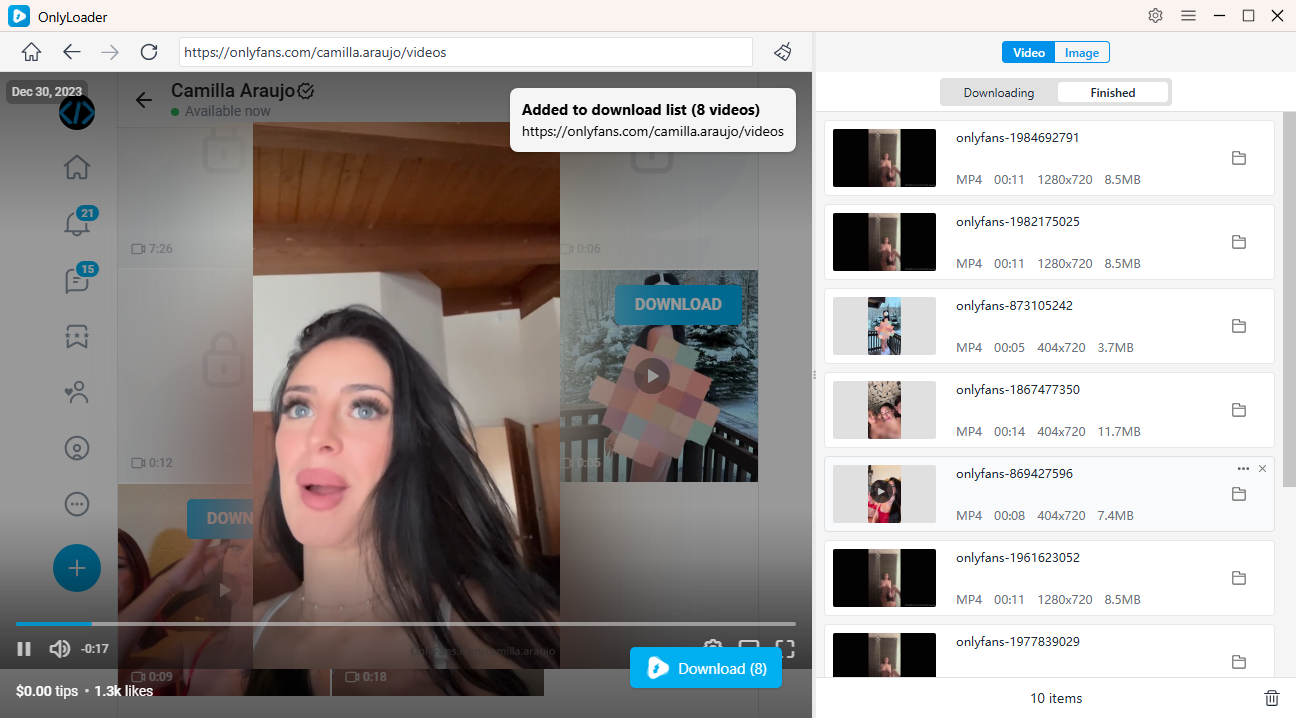
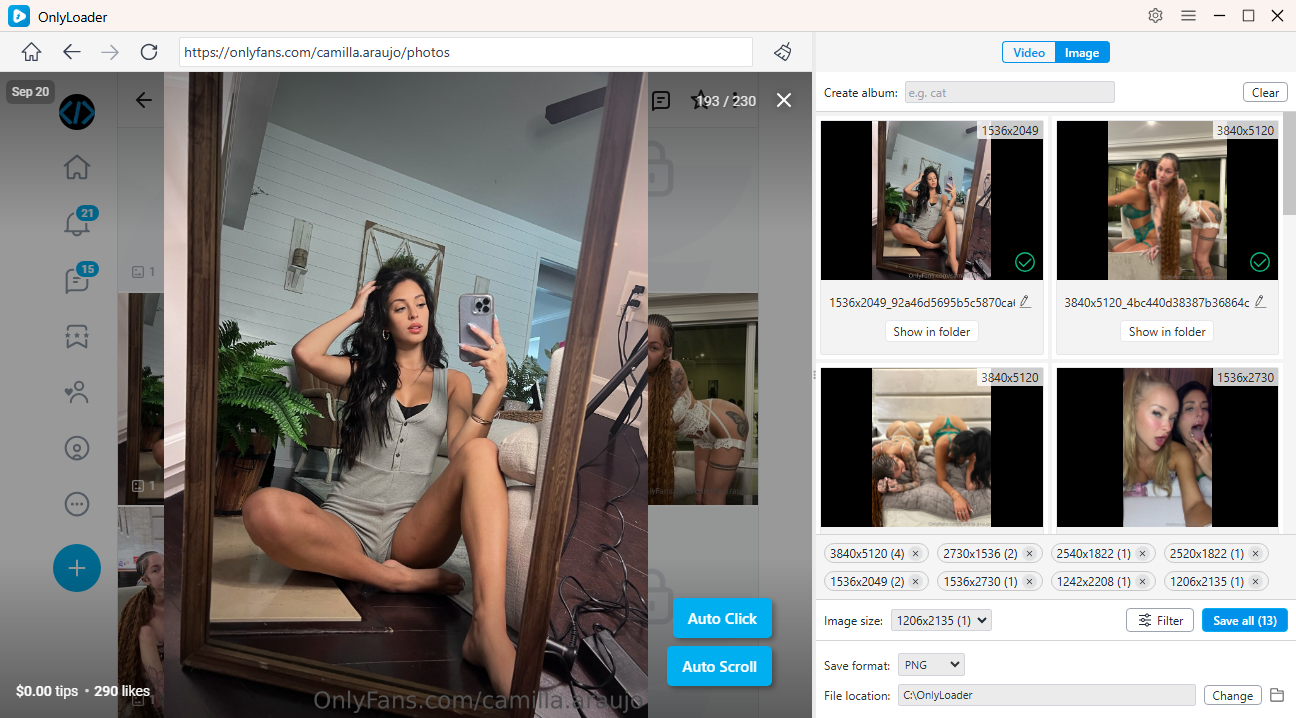
- オートクリック機能を有効にすると、ページから写真を自動的に抽出し、保存したい写真を選択して、複数のファイルをまとめて一度にダウンロードできます。
6. 結論
OnlyFansの年齢確認は、ユーザーが規定の年齢基準を満たしていることを確認するための重要なセキュリティおよびコンプライアンス対策です。確認プロセスには時として疑問や遅延が生じる場合がありますが、公式な方法で確認を完了することが最も安全な方法です。
独自の承認済みメディアコレクションを整理する必要があるユーザー向け、 OnlyLoader アクセス可能なコンテンツをより効率的に管理・保存するための便利な方法を提供します。責任あるプラットフォーム利用と信頼性の高いメディア管理ツールを組み合わせることで、ユーザーはより安全で整理されたオンライン体験を楽しむことができます。