 OnlyLoader
Why Does OnlyFans Need a Card for Free Subscriptions?

Many new users are surprised when signing up for OnlyFans and discovering that a payment card is required—even for free subscriptions. At first glance, this can feel unnecessary or even suspicious. After all, if the content is free, why should you need to provide billing information?
The answer lies in how OnlyFans operates as a platform. In this article, we’ll explain why OnlyFans requires a card for free subs, whether you’ll be charged automatically, how to stay safe, and a useful tip for managing your content.
1. Why Does OnlyFans Need a Card for Free Subs?

Even when a creator offers free subscriptions, OnlyFans may still ask for your payment details. Here are the main reasons:
1.1 Age and Identity Verification
OnlyFans is an adult platform, meaning all users must be 18 years or older. Requiring a valid payment method helps:
- Confirm that users are real individuals
- Reduce underage access
- Add an extra layer of identity verification
While it’s not the only verification method, having a card on file supports compliance with legal and platform requirements.
1.2 Preventing Spam and Fake Accounts
If OnlyFans allowed completely free sign-ups with no verification, the platform could quickly become flooded with:
- Bots
- Fake profiles
- Spam accounts
Requiring a card acts as a barrier that discourages abuse and improves the overall user experience.
1.3 Supporting Future Transactions
Even if a subscription is free, creators often offer additional paid content, such as:
- Pay-per-view (PPV) messages
- Exclusive locked posts
- Tips and custom content
Having a card on file allows users to make instant purchases without needing to re-enter payment details each time.
1.4 Subscription Flexibility and Upgrades
Some creators use free subscriptions as an entry point and later offer:
- Paid subscription tiers
- Special promotions
- Limited-time offers
A saved payment method makes it easier for users to upgrade or continue access if the subscription changes.
1.5 Compliance with Payment Processors
OnlyFans works with banks and payment providers that enforce strict rules around:
- Fraud prevention
- Chargebacks
- User verification
Requiring a payment method helps the platform stay compliant and maintain access to financial services.
2. Will You Be Charged Automatically?
This is one of the biggest concerns—and the good news is:
👉 No, you won’t be charged just for subscribing to free content.
However, charges can occur in certain situations:
You may be charged if you:
- Subscribe to a paid account
- Purchase pay-per-view content
- Send tips to creators
- Accept a subscription that later renews at a paid rate
Important tips:
- Always check whether a subscription is truly free
- Review the creator’s pricing details
- Turn off auto-renew if you don’t want future charges
By staying aware of these factors, you can avoid unexpected payments.
3. How to Stay Safe on OnlyFans?
Providing payment information online always requires caution. Here are some practical ways to stay safe on OnlyFans:
- Monitor Your Subscriptions
Regularly review your active subscriptions to ensure you’re not being charged unexpectedly.
- Turn Off Auto-Renew
If you’re unsure about continuing a subscription, disable auto-renew immediately after subscribing.
- Be Careful with PPV Messages
Creators can send paid content via messages. Always check the price before unlocking anything.
- Use Secure Payment Methods
Consider using a card with fraud protection or virtual card features for added security.
- Avoid Suspicious Links
Only interact with content and links within the official OnlyFans platform to reduce risks.
4. Bonus Tip: Back Up OnlyFans Content with OnlyLoader
If you subscribe to creators—whether free or paid—you may want to save content for offline access or personal organization. However, once a subscription ends, you may lose access to that content.
This is where OnlyLoader can help. OnlyLoader is a tool designed to download and manage OnlyFans media efficiently.
Key Benefits of OnlyLoader:
- Batch download photos and videos from OnlyFans creators in one click
- Enjoy high-quality media with original resolution preserved
- Easily filter images by size and file type
- Export content in MP4, PNG, and other common formats
- Works seamlessly on Windows and Mac
Steps to use OnlyLoader:
- First, install OnlyLoader and open it on your computer.
- Log in to your OnlyFans account directly within the built-in browser, then visit a creator’s profile you’re subscribed to.
- Play any video from the “Videos” tab and click download—OnlyLoader will automatically queue and batch download all videos.
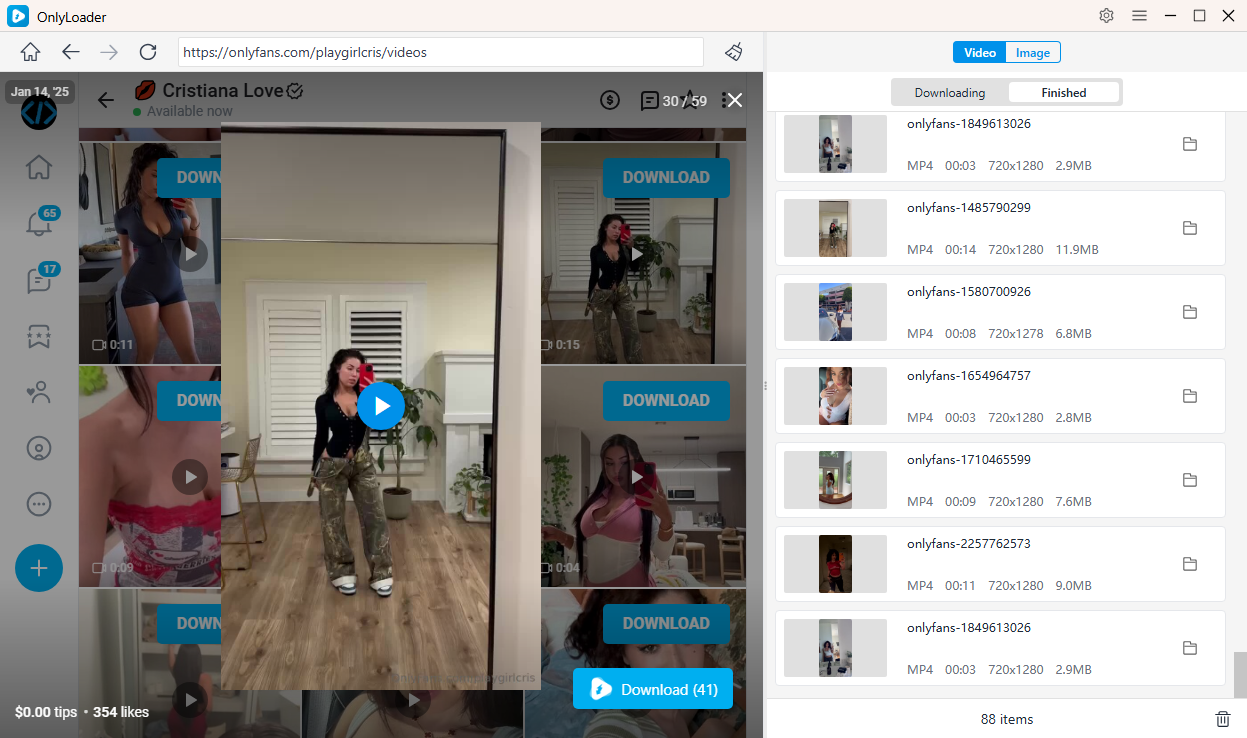
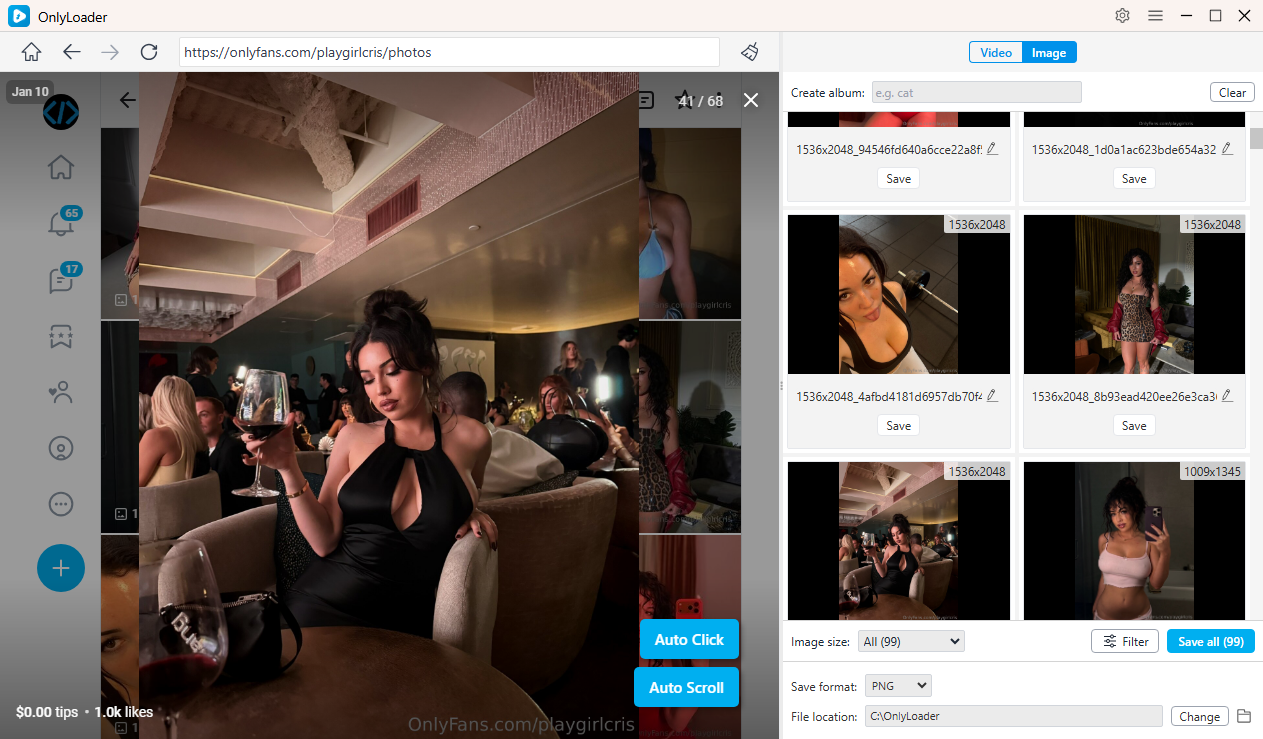
- For photos, turn on auto-click to let OnlyLoader scan for images, then choose what you want and download all photos at once.
5. Conclusion
So, why does OnlyFans need a card for free subscriptions? The requirement goes beyond simple billing—it’s about verification, security, and platform stability. By requiring a payment method, OnlyFans can reduce fraud, comply with regulations, and provide a smoother experience for both users and creators.
The good news is that you won’t be charged automatically just for subscribing to free content. As long as you stay aware of paid features and manage your subscriptions carefully, you can use the platform without unexpected costs.
To enhance your experience even further, consider using tools like OnlyLoader. With its ability to batch download and organize content, OnlyLoader is a highly recommended solution for anyone who wants more control over their OnlyFans media.
By combining smart subscription habits with the right tools, you can enjoy OnlyFans safely, efficiently, and on your own terms.
- OnlyFans Videos Not Playing? Try These Fixes
- How to Resolve OnlyFans Login with X Cannot Change Email?
- How to Use Cat-Catch to Download DRM OnlyFans Videos
- Best OnlyFans Finders by Image to Search Profiles
- How to Download Kirstentoosweet OnlyFans Media?
- What Does OnlyFans Show Up As on Bank Statement?
- A Complete Guide on How to Tip on OnlyFans