 OnlyLoader
OnlyFans DRM Explained: How It Works and What You Need to Know

OnlyFans is a subscription-based platform where creators share exclusive content with paying subscribers, making Digital Rights Management (DRM) an important technology for protecting their premium videos and photos from unauthorized copying, downloading, and redistribution.
In this article, we’ll explain what OnlyFans DRM is, how it works, how to enable DRM video protection, and introduce an advanced tool can help download OnlyFans videos in bulk.
1. What Is OnlyFans DRM?
DRM stands for Digital Rights Management. It refers to technologies designed to protect digital content and control how users access, play, copy, and distribute it.
On subscription-based platforms like OnlyFans, content protection is important because creators share exclusive material with authorized subscribers. DRM and other security mechanisms can help prevent unauthorized access and reduce the risk of paid content being redistributed without permission.
Common purposes of DRM include:
- Access control: Restricting content access to authorized users.
- Copy protection: Making unauthorized copying more difficult.
- Secure streaming: Protecting media during delivery and playback.
- Content management: Helping creators maintain control over exclusive content.
- Unauthorized distribution prevention: Reducing the risk of paid media being shared without permission.
It’s worth noting that not every OnlyFans video necessarily uses traditional DRM encryption. Some restrictions may rely on account authentication, temporary media URLs, encrypted streaming, or server-side access controls.
2. How Does OnlyFans DRM Work?
DRM systems generally combine encryption, authentication, licensing, and compatible playback software to protect digital media.
When a user accesses protected video content, several processes may take place behind the scenes:
- Content encryption: Video content is encrypted before or during distribution to prevent unauthorized playback.
- User authentication: The platform checks whether the user is logged in and has permission to access the content.
- License authorization: If a DRM system is used, the playback environment obtains an authorized license.
- Content decryption: A compatible DRM component handles authorized playback.
- Video streaming: The browser or supported player displays the video while applying relevant content-protection restrictions.
What Is CDM in OnlyFans DRM?
CDM stands for Content Decryption Module. It is a browser or media-player component that works with supported DRM systems to enable authorized playback of protected content.
Common DRM technologies include:
- Widevine: Google’s DRM technology, commonly supported by Chrome and other browsers.
- PlayReady: Microsoft’s content-protection technology.
- FairPlay: Apple’s DRM technology for supported Apple devices and media environments.
These technologies are not interchangeable, and their availability does not prove that a particular OnlyFans video uses them. The exact protection method depends on the platform’s implementation.
3. How to Enable OnlyFans DRM?
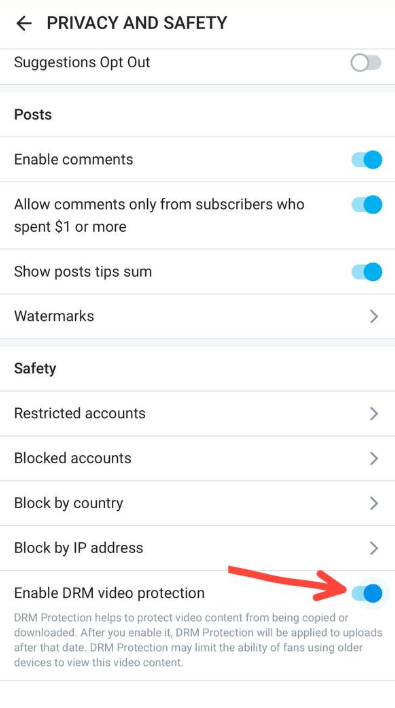
OnlyFans provides creators with a free DRM Video Protection feature to help protect their uploaded videos from unauthorized copying and downloading. Creators can enable this option through their account settings.
Steps to Enable OnlyFans DRM Video Protection:
- Log in to OnlyFans: Open the OnlyFans website and sign in to your creator account.
- Open Settings: Click your profile menu and navigate to Settings.
- Go to Privacy and Safety: Find the Privacy and Safety section in your account settings.
- Enable DRM Video Protection: Locate the Safety settings and select Enable DRM Video Protection.
- Apply the setting: Once enabled, DRM protection will apply to videos uploaded after that point.
4. Can You Download OnlyFans DRM-Protected Videos?
Downloading OnlyFans videos depends on the content’s protection, available permissions, and the platform’s restrictions. Ordinary video downloaders may fail to save protected streams because they cannot access or process the required authorized playback components.
OnlyLoader is a desktop application designed to help users download and organize OnlyFans videos and images. It includes a built-in browser for accessing account content and provides options for batch downloading, media selection, and file management.
Main Features of OnlyLoader:
- Download multiple accessible videos from creator profiles.
- Advertise support for available video resolutions from 720p to 4K/8K.
- Support formats such as MP4, MOV, MKV, AVI, MP3, and M4A.
- Built-in browser to access OnlyFans through the software.
- Save available images in formats such as JPG, PNG, and WebP.
Steps using OnlyLoader to Download DRM Videos from OnlyFans:
- Download and install OnlyLoader on your Windows or Mac, then open the software and set your desired download options.
- Open the built-in browser access OnlyFans using your authorized account, then navigate to the creator profile and open the relevant Videos section.
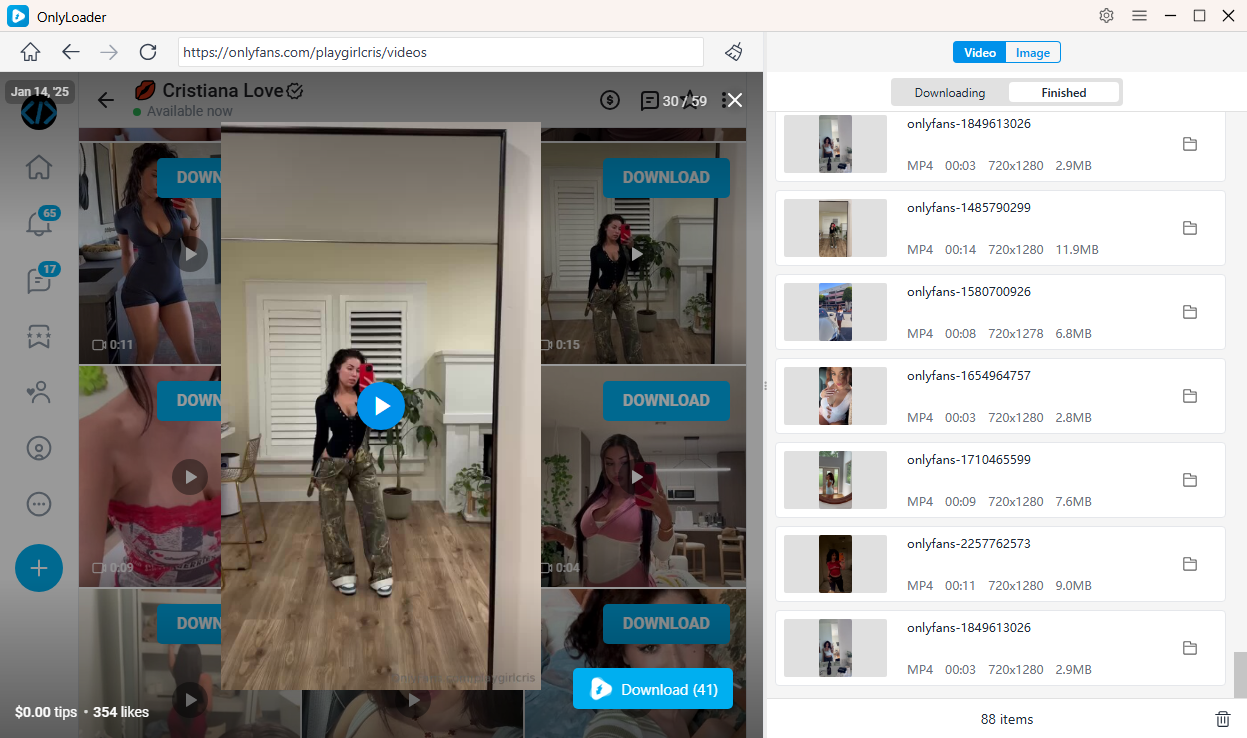
- Choose and play a video, then OnlyLoader will detect all the videos in the section and allow you to download all of them in just one click.
- Check the Finished section to locate and organize all the downloaded DRM videos.
5. Conclusion
OnlyFans DRM is an important content-protection feature that helps creators safeguard their exclusive videos against unauthorized copying and distribution. By understanding how DRM works, how CDM technologies support protected playback, and how to enable DRM Video Protection in account settings, creators can take additional steps to protect their content.
For users who want to manage authorized OnlyFans media, OnlyLoader offers a desktop solution with bulk downloading, multiple format options, a built-in browser, and file-management features.