 OnlyLoader
Can I Get a Refund for an OnlyFans Subscription?

Subscribing to creators on OnlyFans is quick and convenient, giving you instant access to exclusive photos, videos, and messages. However, many users find themselves asking the same question after making a purchase: can I get a refund for an OnlyFans subscription?
Whether you subscribed by mistake, didn’t enjoy the content, or forgot to cancel before renewal, it’s important to understand how refunds work on OnlyFans. Unlike traditional eCommerce platforms, OnlyFans deals with digital content, which significantly affects its refund policy.
In this guide, we’ll break down whether refunds are possible, when exceptions may apply, what you won’t get refunded for, and what alternatives you have. We’ll also cover how to back up your content before making any account changes.
1. Can I Get a Refund for an OnlyFans Subscription?
In most cases, OnlyFans subscriptions are non-refundable.
Once you subscribe to a creator and gain access to their content, the transaction is considered complete. This means:
- Refunds are not provided for changes of mind
- Canceling a subscription does not refund your current billing cycle
- Access remains active until the end of the subscription period
Even if you:
- Didn’t like the content
- Didn’t use the subscription
- Subscribed accidentally
👉 You typically won’t be eligible for a refund.
This policy exists because digital content is delivered instantly. Once you’ve accessed it, it can’t be “returned” like a physical product.
2. When Refunds Might Be Possible
Although refunds are generally not offered, there are a few situations where you may be eligible:
1) Unauthorized Transactions
If someone accessed your account without permission and made a purchase, you can report it.
2) Billing Errors or Duplicate Charges
If you were charged incorrectly, you may qualify for a refund.
Examples include:
- Being charged twice for the same subscription
- Incorrect billing amounts
- Technical payment issues
3) Charges After Cancelation
If you canceled your subscription but were still billed, this could be reviewed as a refund case.
4) Technical Issues
In rare situations, if you paid for content but couldn’t access it due to a platform error, support may investigate.
3. What You WON’T Get Refunded For
Understanding what is not refundable is just as important:
- Subscriptions you regret purchasing
- Content you didn’t like
- Forgetting to cancel before renewal
- Pay-per-view (PPV) messages
- Tips sent to creators
- General dissatisfaction
👉 These are considered user decisions, and refunds are almost always denied.
4. What You Can Do Instead
If a refund isn’t possible, here are some practical alternatives:
1) Cancel Your Subscription
Canceling prevents future charges.
- You’ll still have access until the end of your billing period
- No additional payments will be made
2) Contact OnlyFans Support
If you believe your case is valid:
- Submit a support request
- Include transaction details and evidence
- Be clear and concise in your explanation
3) Request a Chargeback (Last Resort)
You can contact your bank or payment provider to dispute the charge.
⚠️ Warning:
- This may result in account suspension or a permanent ban
- Future transactions on OnlyFans could be blocked
Only use this option in cases like fraud or serious billing issues.
4) Be More Selective Moving Forward
To avoid similar situations:
- Check creator previews and activity
- Start with lower-cost subscriptions
- Turn off auto-renew if unsure
5. Bonus: Back Up OnlyFans Content with OnlyLoader
Before canceling your subscription or deleting your account, it’s important to save any content you want to keep. Once your subscription ends, you may lose access to previously available media.
This is where OnlyLoader can help. OnlyLoader is a specialized tool designed to download and manage OnlyFans content efficiently.
Key Features of OnlyLoader:
- Batch download photos and videos from OnlyFans creators in one go
- Maintain original quality for the best viewing experience
- Easily filter and choose images by size and format
- Save media in MP4, PNG, and other widely used formats
- Fully supported on Windows and Mac
How to use OnlyLoader:
- Get started by installing OnlyLoader on your Windows or Mac device and opening the app.
- Log in to your OnlyFans account directly within the built-in browser, then head to a creator’s profile you’re subscribed to.
- Simply play any video under the “Videos” tab, and click download – OnlyLoader will queue and download all videos automatically.
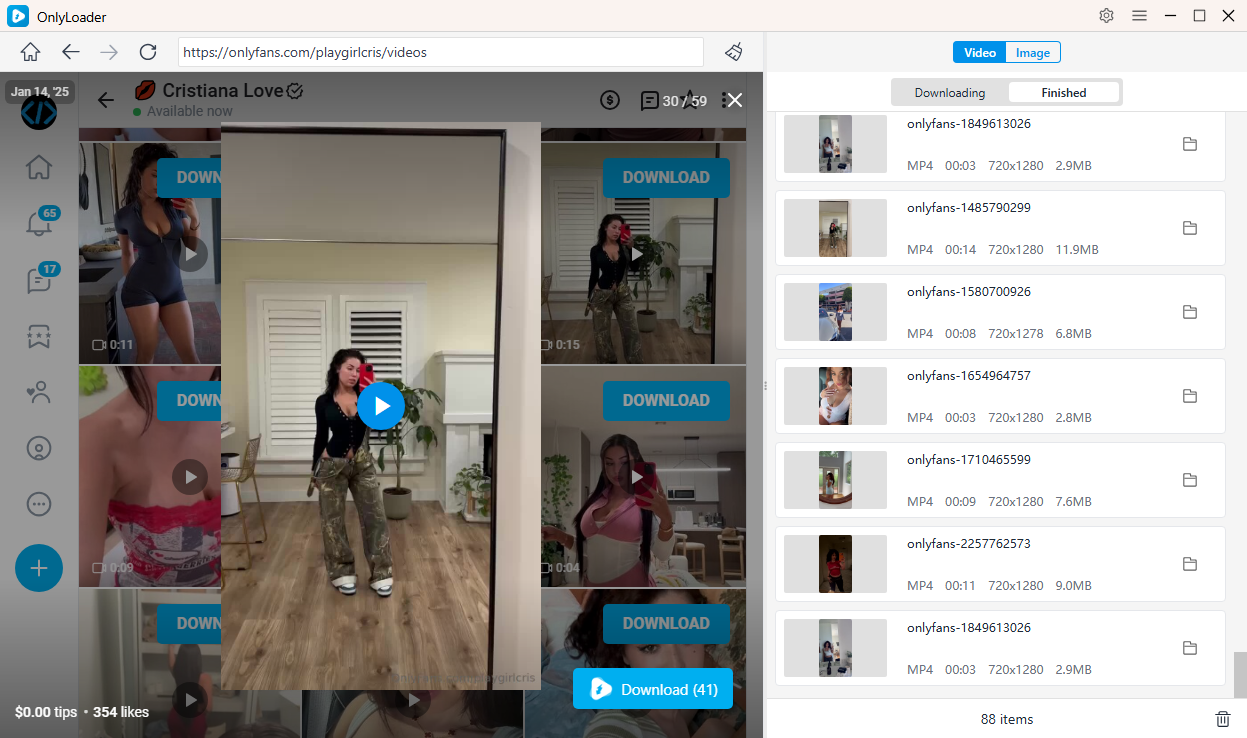
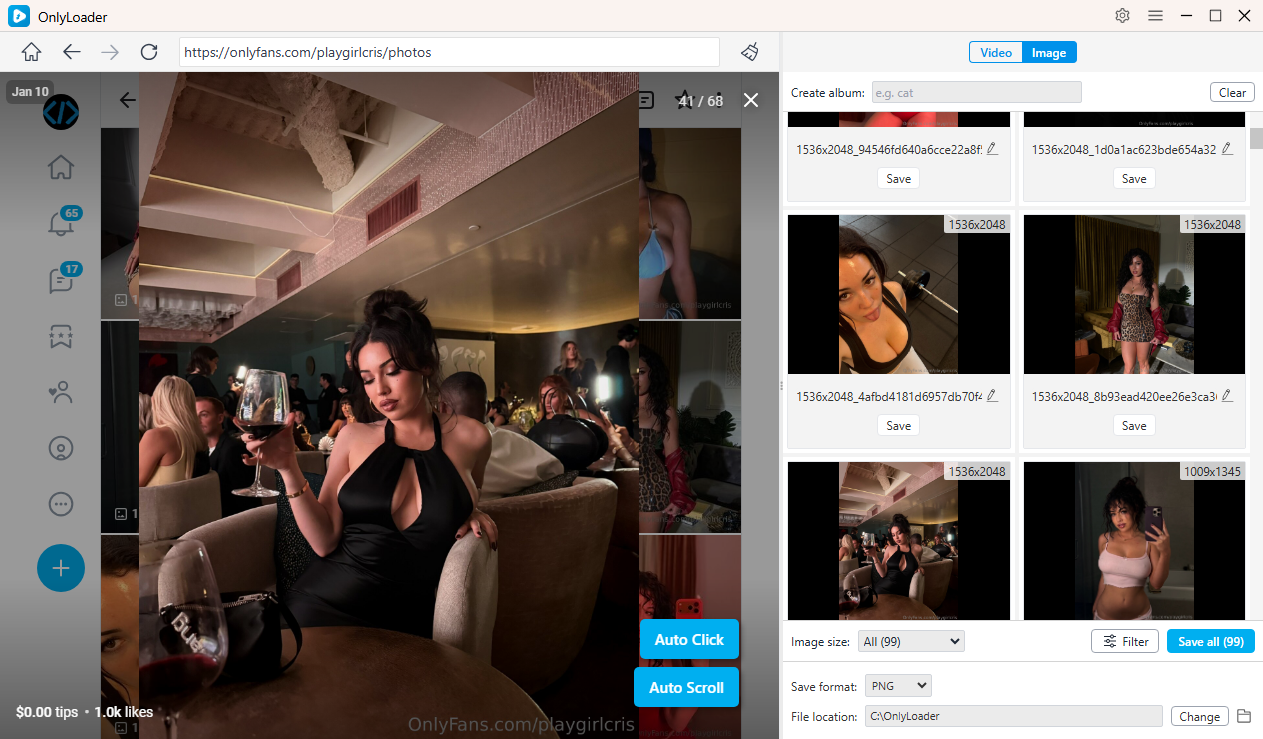
- For photos, enable the auto-click feature to scan the entire profile. Once images are loaded, filter and download everything in one click.
6. Conclusion
So, can you get a refund for an OnlyFans subscription? In most cases, the answer is no. OnlyFans has a strict policy that treats subscriptions as final once content access is granted. However, exceptions may apply in cases like unauthorized transactions, billing errors, or technical issues.
If a refund isn’t possible, your best options are to cancel your subscription, contact support if necessary, and take steps to avoid future unwanted charges.
Most importantly, don’t forget to back up your content before making any changes. Tools like OnlyLoader make this process fast, efficient, and hassle-free. With its batch downloading, high-quality output, and ease of use, OnlyLoader is a highly recommended solution for anyone looking to сохранить and manage their OnlyFans media.
- Best OnlyFans Finders by Image to Search Profiles
- How to Download Kirstentoosweet OnlyFans Media?
- What Does OnlyFans Show Up As on Bank Statement?
- A Complete Guide on How to Tip on OnlyFans
- How to Make $100 a Day on OnlyFans?
- How to Pay for OnlyFans Anonymously?
- A Complete Guide to OnlyFans Age Verification